
ASP.NET Core Web API Getting Started: Improving Enum Comments
TLDR
- The default
Swashbuckle.AspNetCorecannot automatically parse and display XML comments for Enum members. - Using
JsonStringEnumConverterallows the API to support string-formatted Enum input and output, but it does not solve the readability issue in Swagger documentation. - Implementing a custom
ISchemaFilteris the best solution to inject comments from XML documentation into theDescriptionfield of the OpenAPI Schema. - By processing Enum descriptions via
ISchemaFilter, you can maintain the rigor of numeric data transmission while achieving high readability in documentation.
Problem Context: Swagger Cannot Display Enum Member Comments
In ASP.NET Core Web API projects, even if complete XML comments are written in the Enum definition, Swagger UI cannot display this information by default. This prevents developers from understanding the business logic represented by each Enum value directly from the documentation when using the API.
When does this issue occur: When the project uses Swashbuckle.AspNetCore to generate OpenAPI documentation, and the API's DTO contains properties of enum type.
Attempted Solution: Using JsonStringEnumConverter
Some developers try to convert Enums to strings using JsonStringEnumConverter to improve API readability.
- Configuration: Annotate the DTO property with
[JsonConverter(typeof(JsonStringEnumConverter))]or configure it globally inAddJsonOptionswithinProgram.cs. - Result Analysis: Although the API input and output become strings (e.g.,
Sundayinstead of0), the description field in Swagger UI remains blank or only displays an array of values, failing to show the comments from the XML. Furthermore, passing Enums as strings may increase the risk of spelling errors on the client side.
Solution: Implementing a Custom ISchemaFilter
To improve documentation readability without changing the API transmission format, it is recommended to implement ISchemaFilter to parse the XML file and dynamically inject the comments into the Swagger Schema description.
Implementation Steps
- Create an
EnumSchemaFilterclass responsible for reading the XML file and appending member descriptions toschema.Description. - Register the filter and pass the XML file content in the
AddSwaggerGenconfiguration inProgram.cs.
public class EnumSchemaFilter : ISchemaFilter {
    private readonly XDocument xmlComments;

    public EnumSchemaFilter(XDocument xmlComments) {
        this.xmlComments = xmlComments;
    }

    public void Apply(OpenApiSchema schema, SchemaFilterContext context) {
        Type enumType = context.Type;

        if (!enumType.IsEnum) {
            return;
        }

        // Avoid duplicate descriptions
        if (schema.Description?.Contains("<p>Possible values:</p>") == true) {
            return;
        }

        StringBuilder sb = new(schema.Description);
        sb.AppendLine("<p>Possible values:</p>");
        sb.AppendLine("<ul>");

        foreach (string enumMemberName in Enum.GetNames(enumType)) {
            string fullEnumMemberName = $"F:{enumType.FullName}.{enumMemberName}";
            string enumMemberDescription = xmlComments.XPathEvaluate(
              $"normalize-space(//member[@name = '{fullEnumMemberName}']/summary/text())"
            ) as string;

            if (string.IsNullOrEmpty(enumMemberDescription)) {
                continue;
            }

            long enumValue = Convert.ToInt64(Enum.Parse(enumType, enumMemberName));
            sb.AppendLine($"<li><b>{enumValue}[{enumMemberName}]</b>: {enumMemberDescription}</li>");
        }

        sb.AppendLine("</ul>");
        schema.Description = sb.ToString();
    }
}Registering in Swagger
Configure it in Program.cs:
builder.Services.AddSwaggerGen(options => {
    foreach (string xmlFile in Directory.GetFiles(AppContext.BaseDirectory, "*.xml")) {
        XDocument xmlDoc = XDocument.Load(xmlFile);
        options.IncludeXmlComments(() => new XPathDocument(xmlDoc.CreateReader()), true);
        options.SchemaFilter<EnumSchemaFilter>(xmlDoc);
    }
});Execution Result
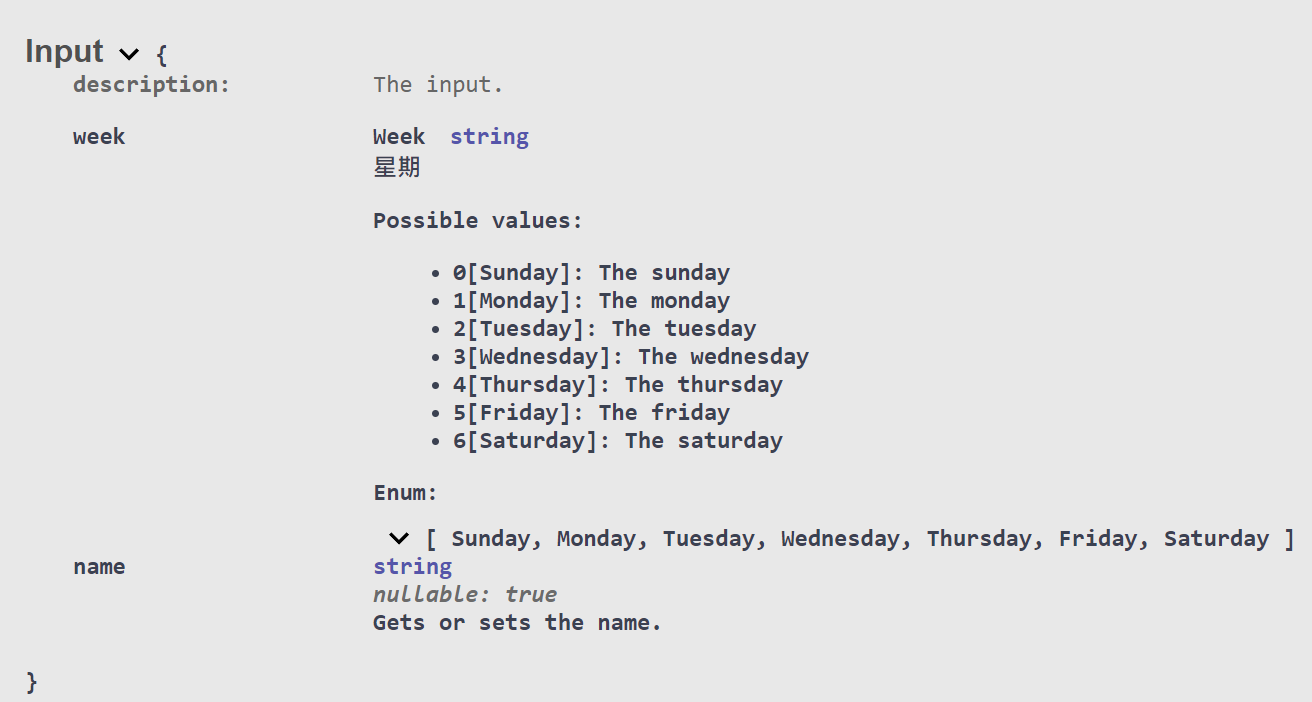
With this approach, the Schema description block in Swagger UI will automatically list all Enum members along with their corresponding values, names, and comments, significantly increasing the reference value of the API documentation.
Change Log
- 2024-04-10 Initial document created.
- 2025-01-16 Fixed a bug where
EnumSchemaFilterwould repeatedly add Enum item descriptions.