
Calling WebService using HttpClient
.NET provides comprehensive support for WebServices, and typically, you can complete a call simply by adding a "Web Reference" in Visual Studio. However, due to certain factors—such as development environments being unable to connect to the WebService—you may sometimes need to call a WebService without adding a Web Reference.
A common practice in .NET Framework is to use a combination of WebClient and Reflection to dynamically generate the WebService code. The code is as follows:
public class InvokeWebService {
    public object InvokeWebservice(string url, string @namespace, string classname, string methodname, object[] args) {
        try {

            if ((classname == null) || (classname == "")) {
                classname = GetWsClassName(url);
            }
            System.Net.WebClient wc = new System.Net.WebClient();
            System.IO.Stream stream = wc.OpenRead(url + "?WSDL");
            System.Web.Services.Description.ServiceDescription sd = System.Web.Services.Description.ServiceDescription.Read(stream);
            System.Web.Services.Description.ServiceDescriptionImporter sdi = new System.Web.Services.Description.ServiceDescriptionImporter();
            sdi.AddServiceDescription(sd, "", "");
            System.CodeDom.CodeNamespace cn = new System.CodeDom.CodeNamespace(@namespace);
            System.CodeDom.CodeCompileUnit ccu = new System.CodeDom.CodeCompileUnit();
            ccu.Namespaces.Add(cn);
            sdi.Import(cn, ccu);

            Microsoft.CSharp.CSharpCodeProvider csc = new Microsoft.CSharp.CSharpCodeProvider();
            System.CodeDom.Compiler.ICodeCompiler icc = csc.CreateCompiler();
            System.CodeDom.Compiler.CompilerParameters cplist = new System.CodeDom.Compiler.CompilerParameters();
            cplist.GenerateExecutable = false;
            cplist.GenerateInMemory = true;
            cplist.ReferencedAssemblies.Add("System.dll");
            cplist.ReferencedAssemblies.Add("System.XML.dll");
            cplist.ReferencedAssemblies.Add("System.Web.Services.dll");
            cplist.ReferencedAssemblies.Add("System.Data.dll");

            System.CodeDom.Compiler.CompilerResults cr = icc.CompileAssemblyFromDom(cplist, ccu);
            if (true == cr.Errors.HasErrors) {
                System.Text.StringBuilder sb = new StringBuilder();
                foreach (System.CodeDom.Compiler.CompilerError ce in cr.Errors) {
                    sb.Append(ce.ToString());
                    sb.Append(System.Environment.NewLine);
                }
                throw new Exception(sb.ToString());
            }

            System.Reflection.Assembly assembly = cr.CompiledAssembly;
            Type t = assembly.GetType(@namespace + "." + classname, true, true);
            object obj = Activator.CreateInstance(t);
            System.Reflection.MethodInfo mi = t.GetMethod(methodname);
            return mi.Invoke(obj, args);
        } catch (Exception ex) {
            throw new Exception(ex.InnerException.Message, new Exception(ex.InnerException.StackTrace));
        }
    }

    private string GetWsClassName(string wsUrl) {
        string[] parts = wsUrl.Split('/');
        string[] pps = parts[parts.Length - 1].Split('.');

        return pps[0];
    }
}However, since .NET Core does not include the "System.Web.Services" library, I referred to this article: ".Net core calling WebService", which uses HttpClient to call the WebService via SOAP message format.
Regarding the WebService SOAP message format, you can find a WebService written in C# and check the Request and Response formats for a specific method at the URL {httpUrl}?op={method}. Generally, it provides "SOAP 1.1", "SOAP 1.2", and "HTTP POST" formats. Below is an example of the "SOAP 1.2" format used in this instance.
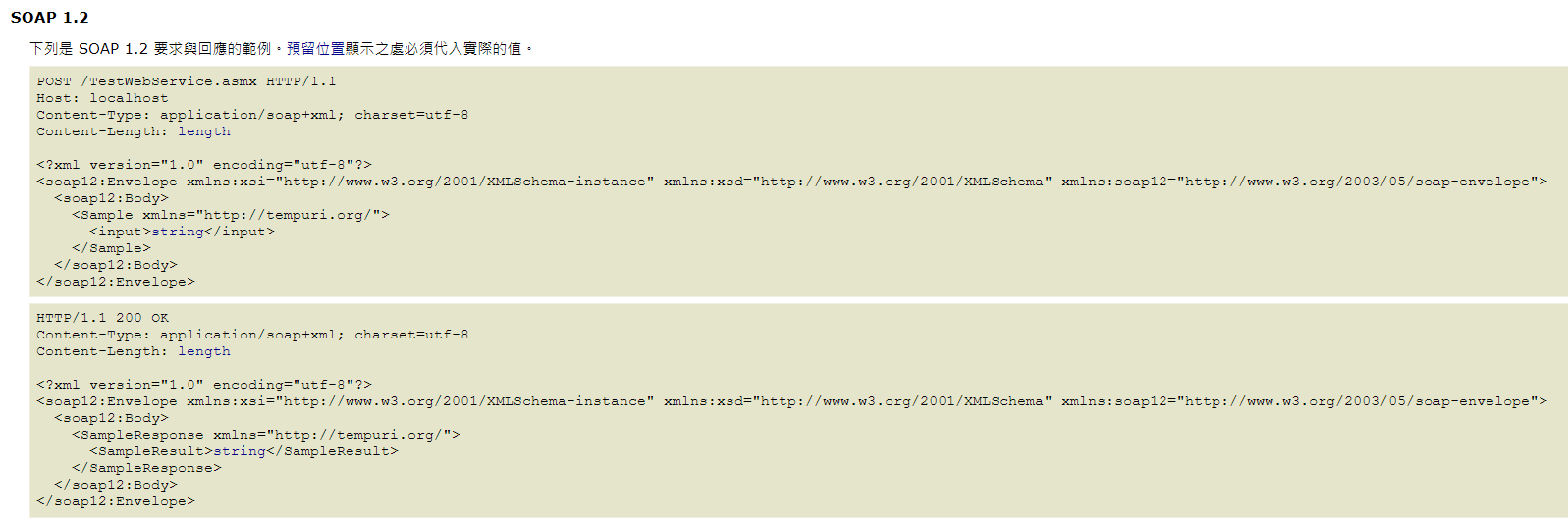
Zoom in to view.
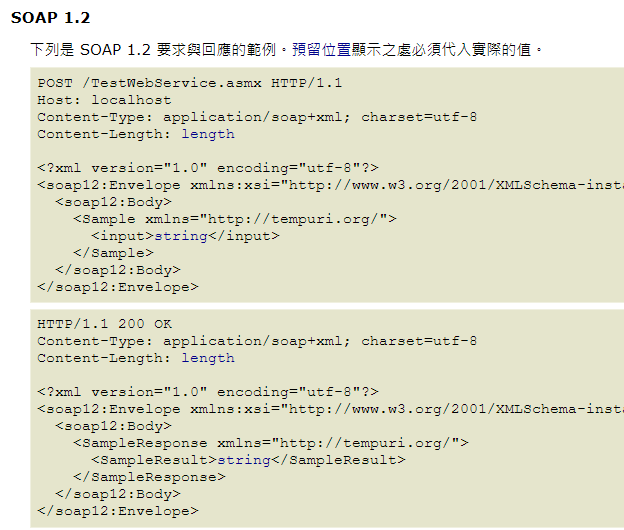
Of course, I was not entirely satisfied with the solution in the article because the actual input and output types are not necessarily simple types. Therefore, I used XmlSerializer to perform conversions between Objects and XML. The final code is as follows:
public static class WebServiceUtils {
    private static readonly HttpClient httpClient = new HttpClient();

    public static async Task<TResponse> ExecuteAsync<TResponse>(string uri, string method, IDictionary<string, string> arguments, string @namespace = "http://tempuri.org/") {
        XmlSerializerNamespaces serializerNamespaces = new XmlSerializerNamespaces(new[] { XmlQualifiedName.Empty });
        XmlWriterSettings settings = new XmlWriterSettings {
            Indent = true,
            OmitXmlDeclaration = true
        };

        string argsXml = string.Join("", arguments.Select(x => {
            Type type = x.Value.GetType();
            XmlSerializer _serializer = new XmlSerializer(type);
            StringBuilder sb = new StringBuilder();
            using (XmlWriter writer = XmlWriter.Create(sb, settings)) {
                _serializer.Serialize(writer, x.Value, serializerNamespaces);
                // After the original Serializer, the Root will be the Type Name, so it needs to be replaced with the Dictionary Key.
                // As for why Regex is not used to achieve more precise replacement of the Type Name, it is because there would be issues with aliases.
                // For example: Int32 would become <int></int> instead of <Int32></Int32>
                return Regex.Replace(sb.ToString(), $@"((?<=^<)(\w*)(?=>))|(?<=</)\w*(?=>$)", x.Key);
            }
        }));

        string soapXml = $@"
            <soap12:Envelope xmlns:xsi=""http://www.w3.org/2001/XMLSchema-instance"" xmlns:xsd=""http://www.w3.org/2001/XMLSchema"" xmlns:soap12=""http://www.w3.org/2003/05/soap-envelope"">
              <soap12:Body>
                <{method} xmlns=""{@namespace}"">
                    {argsXml}
                </{method}>
              </soap12:Body>
            </soap12:Envelope>
        ";

        StringContent content = new StringContent(soapXml, Encoding.UTF8, "text/xml");
        using (HttpResponseMessage message = await httpClient.PostAsync(uri, content).ConfigureAwait(false)) {
            if (!message.IsSuccessStatusCode) {
                throw new HttpRequestException($"HTTP request failed with status code {message.StatusCode}: {message.ReasonPhrase}");
            }

            string result = await message.Content.ReadAsStringAsync().ConfigureAwait(false);

            XDocument xdoc = XDocument.Parse(result);
            XNamespace ns = @namespace;
            string resultTag = method + "Result";

            XElement xelement = xdoc.Descendants(ns + resultTag).Single();

            XmlSerializer serializer = new XmlSerializer(typeof(TResponse), new XmlRootAttribute(resultTag) { Namespace = @namespace });

            using (XmlReader reader = xelement.CreateReader()) {

                return (TResponse)serializer.Deserialize(reader);
            }
        }
    }
}Practical Test
Here, we define nested Request and Response classes as the WebService parameters and return values to test if it can support more complex types.
public class Request {
    public int Id { get; set; }

    public string Name { get; set; }

    public List<string> Strings { get; set; }

    public List<InnerRequest> InnerRequests { get; set; }
}

public class InnerRequest {
    public int Id { get; set; }

    public string Name { get; set; }
}

public class Response {
    public int Id { get; set; }

    public string Name { get; set; }

    public List<string> Strings { get; set; }

    public List<InnerResponse> InnerResponse { get; set; }
}

public class InnerResponse {
    public int Id { get; set; }

    public string Name { get; set; }
}The WebService is intentionally designed to use multiple parameters.
[WebService(Namespace = "http://tempuri.org/")]
[WebServiceBinding(ConformsTo = WsiProfiles.BasicProfile1_1)]
[System.ComponentModel.ToolboxItem(false)]
// To allow this Web service to be called from script using ASP.NET AJAX, uncomment the following line.
// [System.Web.Script.Services.ScriptService]
public class TestWebService : System.Web.Services.WebService {

    [WebMethod]
    public Response HelloWorld(Request request1, Request request2) {
        return new Response {
            Id = 31,
            Name = "32",
            Strings = new List<string> {
                "331",
                "332"
            },
            InnerResponse = new List<InnerResponse> {
                new InnerResponse { Id = 3411, Name = "3412" },
                new InnerResponse { Id = 3421, Name = "3422" }
            }
        };
    }
}string uri = "https://localhost:44399/TestWebService.asmx";
string method = "HelloWorld";
IDictionary<string, object> arguments = new Dictionary<string, object>();
Request request1 = new Request {
Id = 11,
Name = "12",
Strings = new List<string> {
"131",
"132"
},
InnerRequests = new List<InnerRequest> {
new InnerRequest { Id = 1411, Name = "1412" },
new InnerRequest { Id = 1421, Name = "1422" }
}
};
Request request2 = new Request {
Id = 21,
Name = "22",
Strings = new List<string> {
"231",
"232"
},
InnerRequests = new List<InnerRequest> {
new InnerRequest { Id = 2411, Name = "2412" },
new InnerRequest { Id = 2421, Name = "2422" }
}
};
arguments.Add("request1", request1);
arguments.Add("request2", request2);
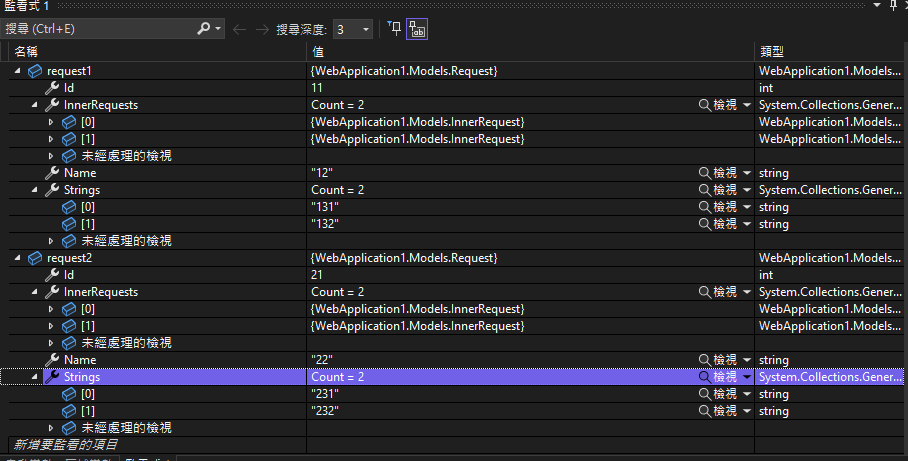
Response response = await WebServiceUtils.ExecuteAsync<Response>(uri, method, arguments);Looking at the Watch window, the WebService correctly received the parameters.
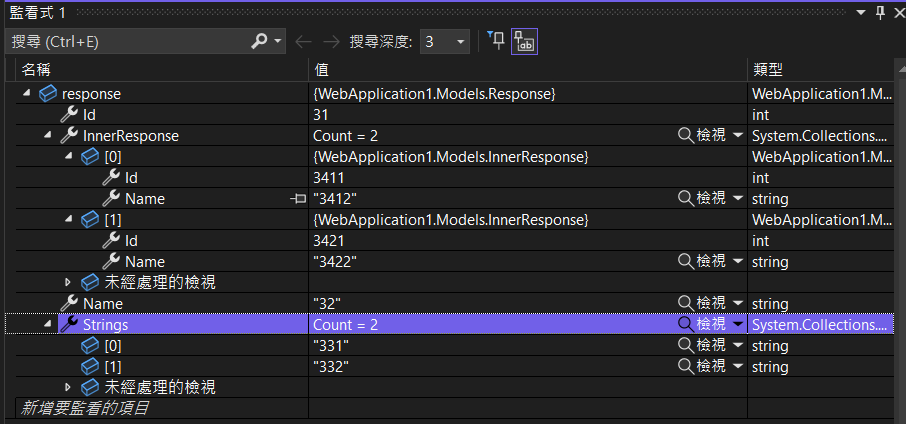
Looking at the Watch window, the execution result is consistent with what the WebService returned.
Change Log
- 2023-02-13 Initial version created.