
ASP.NET Core Web API Learning Notes - Required Field Validation
TLDR
- For value types such as
Boolean, you should useNullabletypes combined with the[Required]attribute to handle required field validation. [BindRequired]is only applicable to Form Data and does not apply to[FromBody]JSON requests.- To resolve the issue of sharing DTOs between Create and Update operations while having different validation logic, you can implement a custom
RequiredForTypeAttribute. - When using custom attributes, you must also implement
ISchemaFilterto adjust Swagger display to ensure the API documentation correctly reflects the required status of fields.
Differences and Use Cases for [Required] and [BindRequired]
When do you encounter this issue: When you need to perform required field validation on value types (Structs) like Boolean, but find that the default value (e.g., false) makes it impossible to determine if the user actually provided a value.
In ASP.NET Core, if you use value types directly, their default values will cause model validation to fail. The solution is to declare the property as a Nullable type and use it with the [Required] attribute.
public class Input {
    [Required]
    public bool? IsRequired { get; set; }
}When the request sends { } and IsRequired is not assigned a value, model validation will correctly trigger an error.
Regarding [BindRequired], please note its limitations:
- This attribute only applies to model binding from Form Data.
- If you are using
[FromBody]to process JSON data,[BindRequired]will not take effect.
Validation Strategy for Partial Updates in Update Operations
When do you encounter this issue: When you want to share DTOs for both Create and Update, but certain fields are required during Create while optional during Update (partial updates).
Since the Inherited property of Attributes only applies to Classes and Methods and cannot directly control the validation behavior of Properties, it is recommended to solve this by creating a custom RequiredForTypeAttribute.
Custom Validation Attribute
By checking validationContext.ObjectType, you can allow the same property to yield different validation results in different classes:
[AttributeUsage(AttributeTargets.Property | AttributeTargets.Field | AttributeTargets.Parameter, AllowMultiple = false)]
public class RequiredForTypeAttribute : RequiredAttribute {
    public Type[] TargetTypes { get; set; }

    public RequiredForTypeAttribute(params Type[] targetTypes) {
        TargetTypes = targetTypes ?? throw new ArgumentNullException(nameof(targetTypes));
    }

    protected override ValidationResult IsValid(object value, ValidationContext validationContext) {
        if (!TargetTypes.Contains(validationContext.ObjectType) || IsValid(value)) {
            return ValidationResult.Success;
        }

        string[] memberNames = validationContext.MemberName != null ? new string[] { validationContext.MemberName } : null;
        return new ValidationResult(FormatErrorMessage(validationContext.DisplayName), memberNames);
    }
}Adjusting Swagger Display
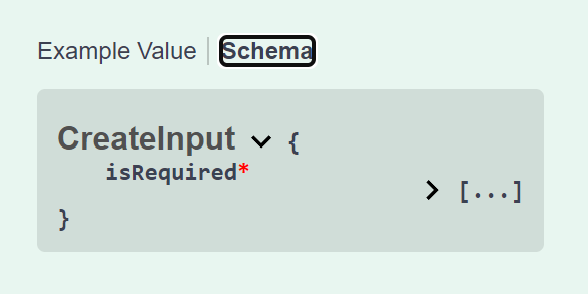
If you use the custom attribute above, Swagger may not automatically identify the required status. You need to implement ISchemaFilter to adjust it manually:
public class RequiredForTypeSchemaFilter : ISchemaFilter {
    public void Apply(OpenApiSchema schema, SchemaFilterContext context) {
        if (schema.Properties is null) return;

        foreach (PropertyInfo prop in context.Type.GetProperties()) {
            var attr = prop.GetCustomAttributes<RequiredForTypeAttribute>().FirstOrDefault();

            if (attr is not null && !attr.TargetTypes.Contains(context.Type)) {
                foreach (var schemaPropPair in schema.Properties) {
                    if (string.Equals(schemaPropPair.Key, prop.Name, StringComparison.OrdinalIgnoreCase)) {
                        schema.Required.Remove(schemaPropPair.Key);
                        break;
                    }
                }
            }
        }
    }
}
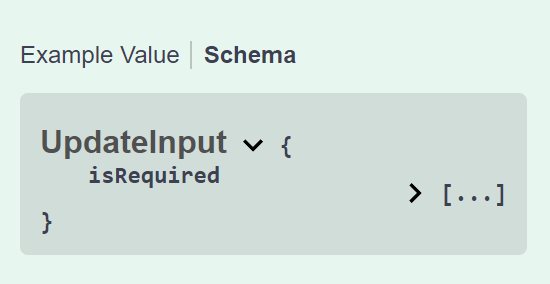
Change Log
- 2024-04-13 Initial documentation created.