
ASP.NET Core Namespace Conflict Issues
TLDR
- If a project name contains keywords such as
SystemorMicrosoft, it is highly likely to cause namespace resolution conflicts. - Razor View files generate additional global
usingdirectives during compilation. Even if the C#Global Using Directivesfeature is disabled, the conflict persists. - When a conflict occurs, the compiler attempts to look for system classes under the project's custom namespace (e.g.,
TestNameSpace.System.Threading), resulting in "type not found" errors. - The solution is to avoid using these keywords as project names. If the issue has already occurred, adjust the namespace settings in
_ViewImports.cshtmlor_ViewStart.cshtml.
Namespace Conflict Scenarios
When do you encounter this issue? When a developer names a project using keywords like System or Microsoft (e.g., naming the project TestNameSpace.System), it leads to compilation failure.
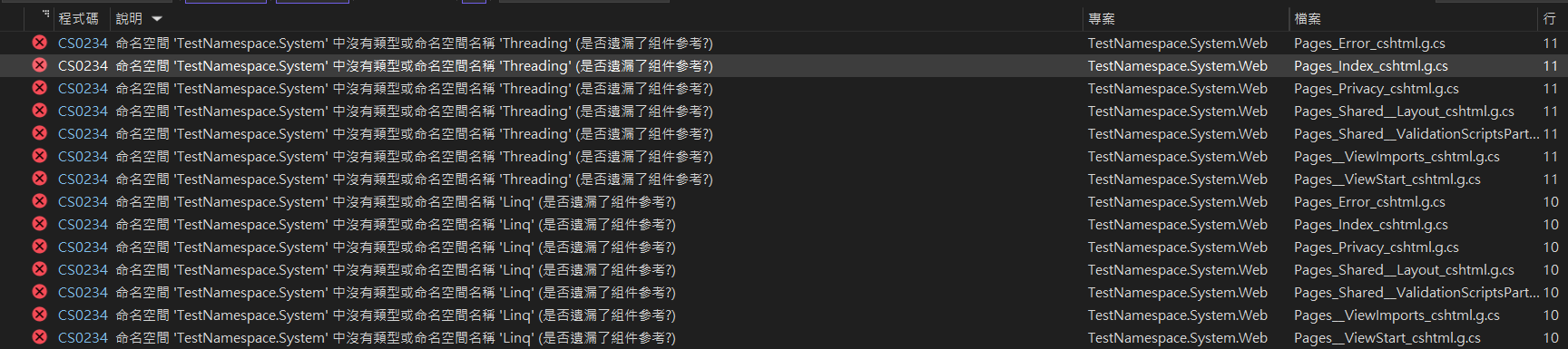
In Razor View files, the compiler will report numerous errors. The error message usually appears as "The type or namespace 'Threading' does not exist in the namespace 'TestNameSpace.System'". This is because the compiler misinterprets System.Threading as a sub-item under the project's custom namespace, rather than referencing the system's System.Threading.
Impact of Global Using Directives
When do you encounter this issue? When using .NET 6 or higher and the implicit global using feature is enabled.
C# 10 introduced the Global Using Directives feature. After the project is built, a {ProjectName}.GlobalUsings.g.cs file is generated in the obj folder. This file automatically adds default system namespaces, for example:
// <auto-generated/>
global using global::System;
global using global::System.Collections.Generic;
global using global::System.IO;
global using global::System.Linq;
global using global::System.Net.Http;
global using global::System.Threading;
global using global::System.Threading.Tasks;If the project name conflicts with System, the compiler will encounter ambiguity when processing these global references.
Razor View Compilation Mechanism and Recommendations
When do you encounter this issue? Even if Global Using Directives is disabled or you are using .NET 5, Razor files still fail to compile.
Research shows that the compilation process of Razor files generates additional .g.cs files, which contain default using settings. These settings do not rely entirely on Global Using Directives but are written by the Razor engine during compilation.
To resolve this, check the namespace definitions in _ViewStart.cshtml or _ViewImports.cshtml. It is recommended to explicitly specify the namespace using the @namespace directive to avoid conflicts with system keywords:
@using TestNamespace.Sys.Web
@namespace TestNamespace.Sys.Web.Pages
@addTagHelper *, Microsoft.AspNetCore.Mvc.TagHelpersTIP
In .NET 5, the compiled Razor files are located in the obj\Debug\net5.0\Razor\Pages\ directory. In .NET 6 and higher, the path to the generated intermediate files may vary.
Conclusion
To avoid unexpected namespace resolution errors in ASP.NET Core projects, it is recommended to avoid using keywords like System or Microsoft when naming your projects.
Change Log
- 2023-01-09 Initial version created.