
A Brief Discussion on SQL Server Date/Time Queries and Precision Rounding Pitfalls
TLDR
datetimeandsmalldatetimeshould be completely deprecated in favor ofdatetime2as the standard time type to avoid precision rounding and range limitation issues.- It is recommended to explicitly specify database column precision (e.g.,
datetime2(0)ordatetime2(3)) to avoid migration risks caused by relying on framework defaults. - When performing time range queries, always use the
[Start Time] <= x < [End Time]pattern; the use ofAddTicks(-1)for closed interval handling is strictly prohibited. - The application layer should unify the time source to avoid mixing
GETDATE()in SQL statements or performing complex time calculations, ensuring SARGability and maintaining index performance. - When application variable types are inconsistent with database column types (e.g., querying a
datetimecolumn with adatetime2variable), implicit conversion is triggered, leading to performance degradation or abnormal query results.
Choosing a Date/Time Type in SQL Server
In a SQL Server 2025 environment, the characteristics of different date/time types are as follows:
| Type | Precision | Description |
|---|---|---|
| datetime | 3.33 ms | Legacy system artifact; milliseconds are non-continuous and will automatically round up. |
| smalldatetime | 1 minute | Seconds are rounded to the nearest minute; range is limited to the year 2079. |
| datetime2 | 100 ns | Preferred for new projects; high precision and wide range (years 0001-9999). |
| datetimeoffset | 100 ns | Includes time zone offset, suitable for international applications. |
TIP
In practice, datetime2 or datetimeoffset should be prioritized. smalldatetime carries potential "Y2K" risks, while datetime is no longer recommended for new development due to precision rounding issues. Additionally, if migrating data from Oracle, datetime2 supports the year 0001, effectively resolving write failures caused by datetime only supporting dates from 1753.
Regarding Precision Choices: (0), (3), (7)
- Precision
(0)(Seconds): Suitable for scenarios that do not require high-precision display, avoiding query failures caused by inconsistencies between frontend display and backend storage. - Precision
(3)(Milliseconds): Industry standard, balancing performance and resolution; suitable for most high-concurrency scenarios. - Precision
(7)(100 Nanoseconds): Consistent with C#DateTime.Ticks, suitable for scientific calculations or system logs.
WARNING
If using Entity Framework Code First, be sure to explicitly specify the precision (e.g., .HasPrecision(0)). Do not rely on framework defaults to avoid unexpected behavior during future upgrades or migrations.
Consistency of Time Source and Performance Considerations
When a system uses high precision (e.g., (7)), the issue of inconsistent time sources must be addressed. If DateTime.Now is called repeatedly throughout the application, minor time differences can lead to inconsistent timestamps within the same transaction.
Application Layer vs. Database Layer
It is recommended to unify time processing in the application layer and pass it to the database via parameters.
- When problems occur: Using
GETDATE()directly in SQL statements or performing operations on columns (e.g.,DATEADD(MINUTE, -1, RecordTime) = GETDATE()) will cause SARGability to fail, causing Index Seeks to degrade into Index Scans, severely impacting performance.
// Recommended approach: Get the time in the application layer and pass it as a parameter
DateTime now = DateTime.Now;
db.Table.Where(x => x.RecordTime == now);Pitfalls of Closed Interval Time Queries
When handling time range queries, a common mistake is using AddTicks(-1) to handle the closure of the end time.
- When problems occur: When the database column type is
datetimebut the application variable isdatetime2, the difference in precision causesAddTicks(-1)to produce rounding errors, leading to missing or unexpected data in query results.
Recommended Practice
Always use "half-open" interval queries (inclusive start, exclusive end) to ensure clear semantics and general applicability:
// ✅ Recommended approach
db.Table.Where(x => x.Time >= input.StartTime && x.Time < input.EndTime);Query Anomalies Caused by Precision Rounding
The datetime type rounds milliseconds to 0, 3, or 7. If a datetime variable is declared as '2026-02-10 07:59:59.999', SQL Server will round it up to '2026-02-10 08:00:00.000', causing a discrepancy between the query condition and the actual stored value.
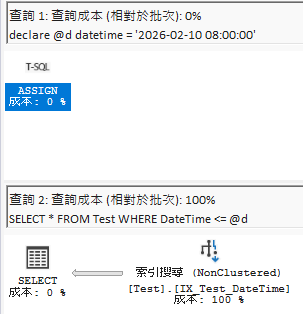
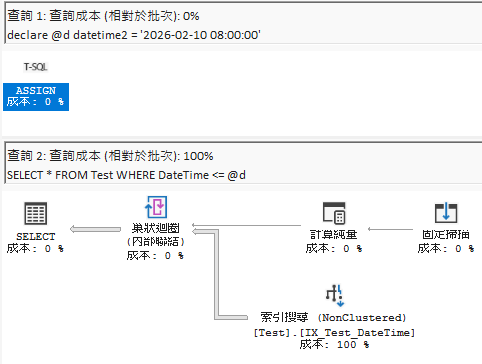
As shown in the figures above, when using <= for comparison, type inconsistency leads to significant differences in execution plans, which in turn affects query performance and accuracy.
Change Log
- 2026-02-12 Initial document creation.