
Solving the Issue of Missing Fonts in .NET Docker Containers
Previously, my DevOps colleagues mentioned that I needed to strengthen my CI/CD and environment-related skills. Thinking about it, they were right; my talent is limited, and there is not much room for improvement in continuing to research .NET. Recently, I have been researching WSL, but I got stuck due to permission issues and didn't manage to write a single note for almost a month. Instead, I ended up writing a few .NET notes in my spare time. However, upon reflection, I realized I had previously handled a Docker issue, which I could barely turn into a note to prove that I am actually doing some research XD.
Font Issues in Docker Containers
In Linux systems, font files are usually located under the "/usr/share/fonts" path. As shown in the image below, you can see a "truetype" folder inside, which stores the font files.
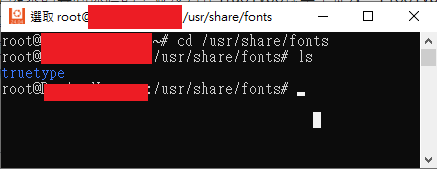
In a Linux container created using a Dockerfile, you might find that the "fonts" folder is missing under the "/usr/share/" path. For example, using the Dockerfile generated by creating a project in Visual Studio:
FROM mcr.microsoft.com/dotnet/aspnet:6.0 AS base

WORKDIR /app
EXPOSE 80
EXPOSE 443

FROM mcr.microsoft.com/dotnet/sdk:6.0 AS build
ARG BUILD_CONFIGURATION=Release
WORKDIR /src
COPY ["TestFont6/TestFont6.csproj", "TestFont6/"]
RUN dotnet restore "./TestFont6/TestFont6.csproj"
COPY . .
WORKDIR "/src/TestFont6"
RUN dotnet build "./TestFont6.csproj" -c $BUILD_CONFIGURATION -o /app/build

FROM build AS publish
ARG BUILD_CONFIGURATION=Release
RUN dotnet publish "./TestFont6.csproj" -c $BUILD_CONFIGURATION -o /app/publish /p:UseAppHost=false

FROM base AS final
WORKDIR /app
COPY --from=publish /app/publish .
ENTRYPOINT ["dotnet", "TestFont6.dll"]When the container runs, you can see that the "fonts" folder is missing.

This is likely because mcr.microsoft.com/dotnet/aspnet:6.0 uses a more streamlined Linux base image (such as Debian, Alpine, etc.). These images usually contain only the most basic system packages and do not pre-install many common font packages to keep the size small.
To solve this problem, you can make the following adjustments to the Dockerfile:
FROM mcr.microsoft.com/dotnet/aspnet:6.0 AS base

RUN sed -i'.bak' 's/$/ contrib/' /etc/apt/sources.list
# Update package list and install ttf-mscorefonts-installer and fontconfig packages
RUN apt-get update; apt-get install -y ttf-mscorefonts-installer fontconfig
# Use the fc-cache command to refresh the font cache and optimize font loading speed
# -f Force refresh of the cache
# -v Display detailed information
RUN fc-cache -f -v

WORKDIR /app
EXPOSE 80
EXPOSE 443

FROM mcr.microsoft.com/dotnet/sdk:6.0 AS build
ARG BUILD_CONFIGURATION=Release
WORKDIR /src
COPY ["TestFont6/TestFont6.csproj", "TestFont6/"]
RUN dotnet restore "./TestFont6/TestFont6.csproj"
COPY . .
WORKDIR "/src/TestFont6"
RUN dotnet build "./TestFont6.csproj" -c $BUILD_CONFIGURATION -o /app/build

FROM build AS publish
ARG BUILD_CONFIGURATION=Release
RUN dotnet publish "./TestFont6.csproj" -c $BUILD_CONFIGURATION -o /app/publish /p:UseAppHost=false

FROM base AS final
WORKDIR /app
COPY --from=publish /app/publish .
ENTRYPOINT ["dotnet", "TestFont6.dll"]This way, the "truetype" folder will appear under the "/usr/share/fonts" path.

Handling .NET 8 Dockerfile Issues
When using a .NET 8 Dockerfile, the method above will encounter the following error:
#5 ERROR: process "/bin/sh -c sed -i'.bak' 's/$/ contrib/' /etc/apt/sources.list" did not complete successfully: exit code: 21Checking the "/etc/apt/" path based on the error message, I found that there is only a "sources.list.d" folder, but no "sources.list" file.

According to the article "Sources.list file is missing in debian12", the Linux distribution used by the mcr.microsoft.com/dotnet/sdk:6.0 image is Debian 11, while mcr.microsoft.com/dotnet/sdk:8.0 has switched to Debian 12. In Debian 12, package management has been changed to use the "/etc/apt/sources.list.d/debian.sources" file.
Here is the adjustment for the .NET 8 Dockerfile:
FROM mcr.microsoft.com/dotnet/aspnet:8.0 AS base

# Find the line matching Components: main in the /etc/apt/sources.list.d/debian.sources file and append contrib to the end of that line.
RUN sed -i 's/^Components: main$/& contrib/' /etc/apt/sources.list.d/debian.sources
# Update package list and install ttf-mscorefonts-installer and fontconfig packages
RUN apt-get update; apt-get install -y ttf-mscorefonts-installer fontconfig
# Use the fc-cache command to refresh the font cache and optimize font loading speed
# -f Force refresh of the cache
# -v Display detailed information
RUN fc-cache -f -v

USER app
WORKDIR /app
EXPOSE 8080
EXPOSE 8081

FROM mcr.microsoft.com/dotnet/sdk:8.0 AS build
ARG BUILD_CONFIGURATION=Release
WORKDIR /src
COPY ["TestFont/TestFont.csproj", "TestFont/"]
RUN dotnet restore "./TestFont/TestFont.csproj"
COPY . .
WORKDIR "/src/TestFont"
RUN dotnet build "./TestFont.csproj" -c $BUILD_CONFIGURATION -o /app/build

FROM build AS publish
ARG BUILD_CONFIGURATION=Release
RUN dotnet publish "./TestFont.csproj" -c $BUILD_CONFIGURATION -o /app/publish /p:UseAppHost=false

FROM base AS final
WORKDIR /app
COPY --from=publish /app/publish .
ENTRYPOINT ["dotnet", "TestFont.dll"]This way, you can also see the "truetype" folder under the "/usr/share/fonts" path.

WARNING
The Dockerfile comments were generated by ChatGPT. Although I verified them via Google, I am not very familiar with environment commands, so I cannot guarantee they are 100% correct.
Change Log
- 2024-08-09 Initial version created.