
A Brief Discussion on the Differences Between Git Merge and Rebase
I am writing this because a colleague recently shared with me that Markdown syntax supports Mermaid, which can be used to draw flowcharts. Since Git branch diagrams are relatively simple, I decided to refer to the documentation "Gitgraph Diagrams" to write this note and experiment with it.
Two Ways to Merge Branches
In Git, there are two common ways to merge branches: git merge and git rebase.
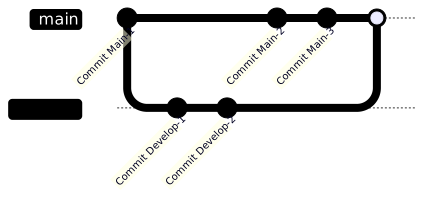
git merge: Merges the changes from one branch into another while preserving the history of both branches. This creates a new merge Commit, which clearly records when the two branches were merged.- Pros:
- Preserves the complete history, including the timestamp of each merge.
- When merging between heterogeneous branches, it is clearer to see how each change was integrated.
- Only requires checking for conflicts against the latest Commit of the target branch. Therefore, you only need to resolve conflicts at most once.
- Cons:
- Frequent merging can make the history complex and difficult to read.
- Each merge creates a new merge Commit, which may lead to a history filled with many unnecessary Commits.
- Pros:
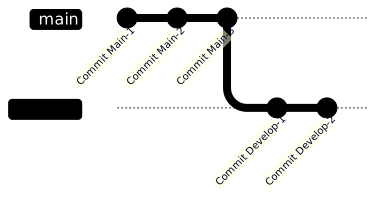
git rebase: Moves the Commits of one branch to the tip of another. This rewrites the history, making the Commits appear as if they started directly from the target branch.- Pros:
- Organizes the Commit history, making it look cleaner and linear.
- Cons:
- The act of rewriting history may result in the loss of merge point records, making it difficult to track when a merge occurred.
- If multiple people are collaborating, it may cause confusion in the Commit history and make conflicts difficult to resolve. However, you generally should not use
git rebaseon shared branches. - When moving each Commit of the current branch onto the base branch, each Commit is checked for conflicts. Therefore, you may need to resolve conflicts multiple times during a
git rebaseprocess.
- Pros:
Branch Diagram Examples
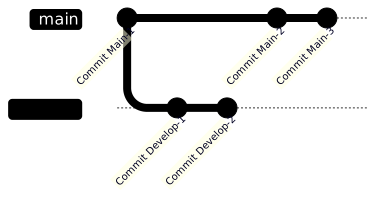
Below are the branch diagrams generated after git merge and git rebase operations.
Original branch history:
Result of Merge:
Result of Rebase:
When to Use Which
When using git merge and git rebase, a common criterion for judgment is the homogeneity or heterogeneity of the branches.
Homogeneous branches:
Homogeneous branches refer to two branches with the same goal, usually referring to different versions of the same branch on remote and local, such as
origin/mainandmain. In this case, usinggit rebaseis more appropriate.Heterogeneous branches:
Heterogeneous branches refer to two branches with different goals, such as
mainanddevelop. In this case,git mergeis usually chosen.Some might find it strange, as synchronization between remote and local branches is usually done via
git pullandgit push, which seems unrelated togit merge. However, in reality,git pullessentially performs agit fetchto synchronize the remote branch Commits to a temporary local branch, and then executesgit mergeto integrate those changes into the local branch.git pullcan be used with the--rebaseparameter, such asgit pull --rebase. This way, after synchronizing remote changes, it usesgit rebaseinstead ofgit mergeto integrate local changes on top of the remote changes.
Another scenario suitable for git rebase is when a team requires that branches must not have conflicts before sending an MR (Merge Request, the term used in GitLab; referred to as Pull Request in GitHub). In this case, the person submitting the MR can first use git rebase to move the current branch's Commits to the latest state of the target branch, resolve all conflicts, and then send the MR.
TIP
The responsibility for resolving conflicts—whether it lies with the reviewer or the MR submitter—varies by team. Please follow your team's guidelines.
Additionally, there is an advanced usage of git rebase called git rebase -interactive {starting Commit}, which can be used to squash, reorder, or modify Commit messages. However, this is beyond the scope of this article and will not be detailed here.
WARNING
Except for git pull --rebase, Rebase-related operations should only be performed on your own development branches; do not operate on shared branches.
Rebase operations on shared branches should only be performed before a git push has been executed. Once a git push has occurred, changing the local repository's Commit history will cause the local and remote histories to diverge. If you use git push --force to forcibly change the remote repository, it will cause inconsistencies with the local remote repository histories of others. Such operations not only affect team collaboration but may also trigger disputes.
Change History
- Initial document creation.