
A Brief Discussion on Synchronizing Navigation Properties and Foreign Keys in Entity Framework
I recently had to handle requirements that involved these concepts for a junior colleague, so I decided to verify them myself to avoid any misinformation.
This article uses "Microsoft.EntityFrameworkCore 8" to test the relationship behavior between parent and child tables. Unless otherwise specified, the results below represent the state before calling SaveChanges(). Please note that results may vary slightly across different versions of Entity Framework.
TIP
The complete executable sample for this article: CloudyWing/EfCoreBehaviorSample.
Entity Structure Definition
public partial class Main {
    public long Id { get; set; }

    public virtual ICollection<Sub> Subs { get; set; } = new List<Sub>();
}

public partial class Sub {
    public long Id { get; set; }

    public long MainId { get; set; }

    public virtual Main Main { get; set; }
}

public partial class TestEFContext : DbContext {
    public TestEFContext(DbContextOptions<TestEFContext> options)
        : base(options) {
    }

    public virtual DbSet<Main> Mains { get; set; }

    public virtual DbSet<Sub> Subs { get; set; }

    protected override void OnModelCreating(ModelBuilder modelBuilder) {
        modelBuilder.Entity<Main>(entity => {
            entity.ToTable("Main");

            entity.Property(e => e.Id).ValueGeneratedNever();
        });

        modelBuilder.Entity<Sub>(entity => {
            entity.ToTable("Sub");

            entity.Property(e => e.Id).ValueGeneratedNever();

            entity.HasOne(d => d.Main).WithMany(p => p.Subs)
                .HasForeignKey(d => d.MainId)
                .OnDelete(DeleteBehavior.ClientSetNull)
                .HasConstraintName("FK_Sub_Main");
        });

        OnModelCreatingPartial(modelBuilder);
    }

    partial void OnModelCreatingPartial(ModelBuilder modelBuilder);
}Associating Child Tables via Navigation Properties in the Parent Table
Example 1: Parent and Child Tables Not Tracked
If neither main nor sub are added to tracking, sub.Main remains null.
using TestEFContext context = new(options);
Main main = new();
Sub sub = new();
main.Subs.Add(sub);Result:
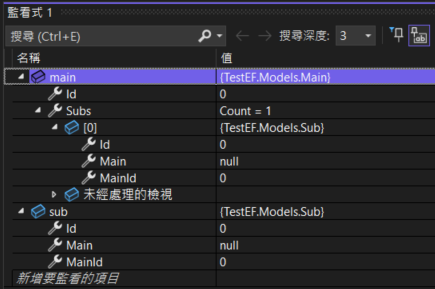
EntityState:
Main State:Detached
Sub State:DetachedExample 2: Only Parent Table Added to Tracking
When main is added to tracking, it will track sub as well, and sub.Main will be updated to main.
using TestEFContext context = new(options);
Main main = new();
Sub sub = new();
main.Subs.Add(sub);
context.Mains.Add(main);Result:
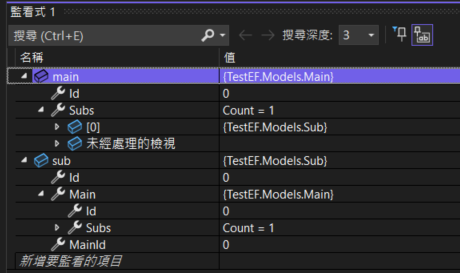
EntityState:
Main State:Added
Sub State:AddedExample 3: Only Child Table Added to Tracking
If only sub is tracked and main is not, sub.Main will not be updated.
using TestEFContext context = new(options);
Main main = new();
Sub sub = new();
main.Subs.Add(sub);
context.Subs.Add(sub);Result:
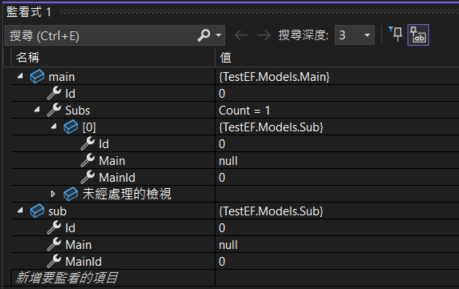
EntityState:
Main State:Detached
Sub State:AddedExample 4: Track Parent Table First, Then Set Navigation Property
Track main first, then execute main.Subs.Add(sub). sub.Main will be null, but it will be updated after calling SaveChanges().
using TestEFContext context = new(options);
Main main = new();
Sub sub = new();
context.Mains.Add(main);
main.Subs.Add(sub);

context.SaveChanges();Result before calling SaveChanges():
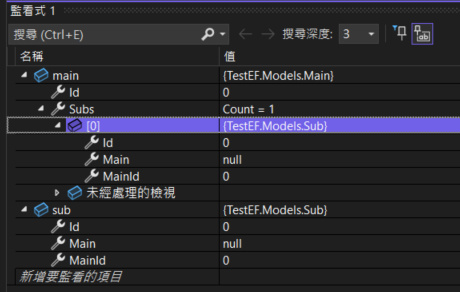
Result after calling SaveChanges():
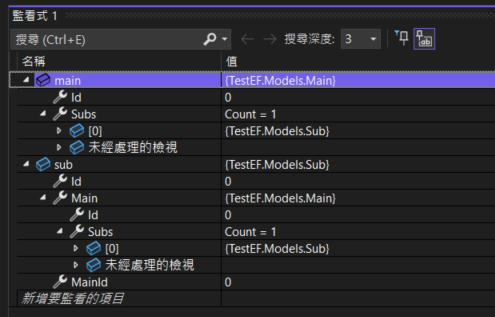
EntityState:
Before SaveChanges:
Main State:Added
Sub State:Added
After SaveChanges:
Main State:Unchanged
Sub State:UnchangedTIP
The reason Sub State is Added is likely because I triggered change tracking on the navigation property when checking the Sub State using context.Entry(sub).State.
Associating Parent Tables via Navigation Properties in the Child Table
Testing different scenarios for setting navigation properties in the child table:
Example 5: Parent and Child Tables Not Tracked
If you set sub.Main = main directly while neither is tracked, main.Subs remains an empty collection.
using TestEFContext context = new(options);
Main main = new();
Sub sub = new();
sub.Main = main;Result:
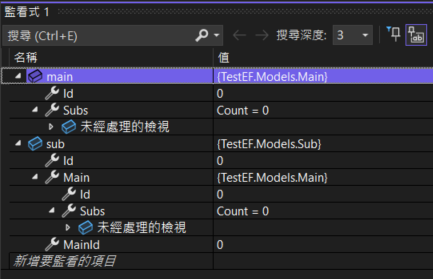
EntityState:
Main State:Detached
Sub State:DetachedExample 6: Parent Table Added to Tracking
When main is tracked but sub is not, main.Subs remains an empty collection.
using TestEFContext context = new(options);
Main main = new();
Sub sub = new();
sub.Main = main;
context.Mains.Add(main);Result:
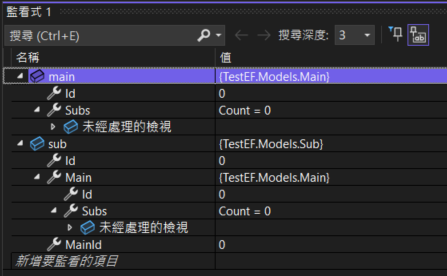
EntityState:
Main State:Added
Sub State:DetachedExample 7: Only Child Table Added to Tracking
When only the child table is tracked, it will automatically track main, and main.Subs will contain sub.
using TestEFContext context = new(options);
Main main = new();
Sub sub = new();
sub.Main = main;
context.Subs.Add(sub);Result:
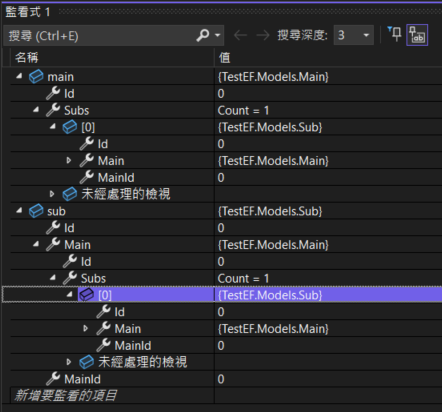
EntityState:
Main State:Added
Sub State:AddedSetting Associations Using Foreign Key Properties
Example 8: Only Tracking the Child Table
If you only track sub and set the foreign key property MainId on sub, neither the main nor sub navigation properties will be synchronized.
using TestEFContext context = new(options);
Main main = new() {
    Id = 1L
};
Sub sub = new (){
    Id = 2L,
    MainId = 1L
};
context.Subs.Add(sub);Result:
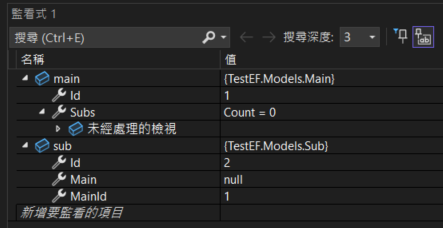
EntityState:
Main State:Detached
Sub State:AddedExample 9: Both Parent and Child Tables Added to Tracking
When both main and sub are tracked, the navigation properties will automatically synchronize.
using TestEFContext context = new(options);
Main main = new() {
    Id = 1L
};
Sub sub = new () {
    Id = 2L,
    MainId = 1L
};
context.Mains.Add(main);
context.Subs.Add(sub);Result:
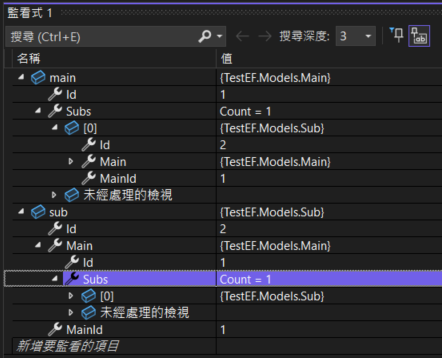
EntityState:
Main State:Added
Sub State:AddedExample 10: Setting Foreign Key Property After Tracking
If you set the foreign key after adding to tracking, the navigation property will not synchronize automatically, but it will be updated after calling SaveChanges().
using TestEFContext context = new(options);
Main main = new() {
    Id = 1L
};
Sub sub = new () {
    Id = 2L
};

context.Mains.Add(main);
context.Subs.Add(sub);
sub.MainId = 1L;

context.SaveChanges();Result before calling SaveChanges():
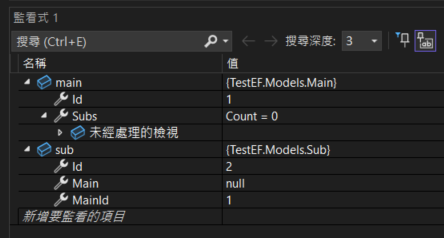
Result after calling SaveChanges():
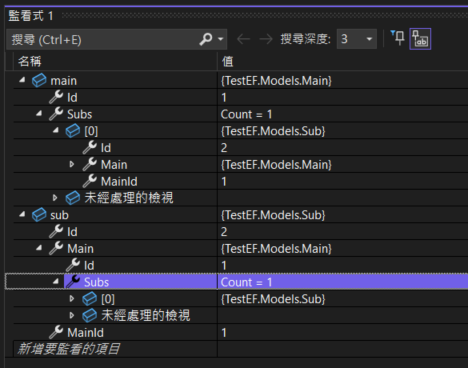
EntityState:
Before SaveChanges:
Main State:Added
Sub State:Added
After SaveChanges:
Main State:Unchanged
Sub State:UnchangedExample 11: Using Find() to Retrieve a Tracked Parent Table
Create and track sub first, then use Find() to retrieve the associated Main data. main.Subs will contain sub.
using TestEFContext context = new(options);
Sub sub = new() {
    Id = 3L
};

context.Subs.Add(sub);
sub.MainId = 1L;

Main main = context.Mains.Find(1L);Result:
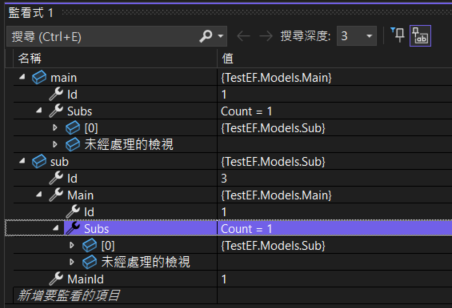
EntityState:
Main State:Unchanged
Sub State:AddedExample 12: Using Find() to Retrieve an Untracked Parent Table
If you track sub first, then use Find() to retrieve Main data that is not associated with the locally tracked entity, the navigation property will not synchronize automatically.
using TestEFContext context = new(options);
Main main2 = new() {
    Id = 2L
};
Sub sub = new() {
    Id = 4L
};

context.Mains.Add(main2);
context.Subs.Add(sub);
sub.MainId = 2L;

Main main1 = context.Mains.Find(1L);Result:
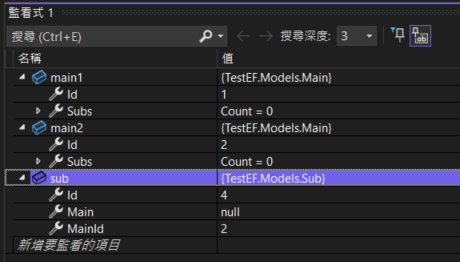
EntityState:
Main1 State:Unchanged
Main2 State:Added
Sub State:AddedOther Operations
Example 13: SaveChanges() Failure
Even if SaveChanges() fails, the navigation properties will still be synchronized.
using TestEFContext context = new(options);
// Intentionally write data with an existing ID
Main main = new() {
    Id = 1L
};
Sub sub = new() {
    Id = 2L
};

try {
    context.Mains.Add(main);
    context.Subs.Add(sub);
    sub.MainId = 1L;
    context.SaveChanges();
} catch {
}
Console.ReadLine();Result:
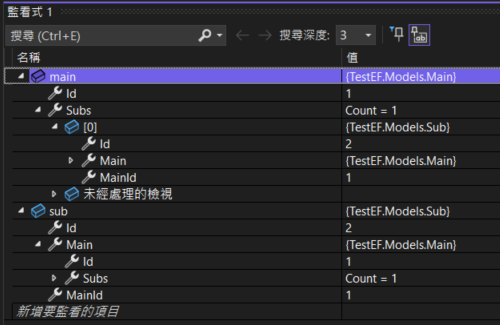
EntityState:
Before SaveChanges:
Main State:Added
Sub State:Added
After SaveChanges:
Main State:Added
Sub State:AddedExample 14: Using Entry() to Retrieve EntityEntry
Executing Entry() will also synchronize the navigation properties of tracked entities.
using TestEFContext context = new(options);
Main main = new() {
    Id = 1L
};
Sub sub = new() {
    Id = 2L
};

context.Mains.Add(main);
context.Subs.Add(sub);
sub.MainId = 1L;

context.Entry(main);
context.Entry(sub);Result:
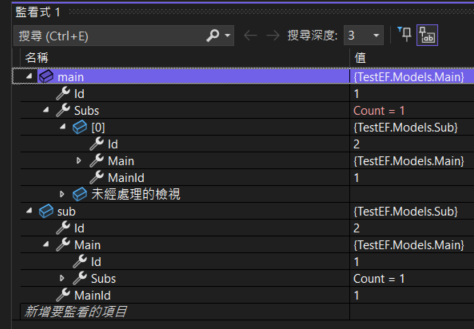
Conclusion
Tracking and Navigation Property Synchronization: The prerequisite for navigation property synchronization is that both entities must be in a tracked state. Any operation that causes an entity's state to change, such as adding, deleting, or manually setting the entity state, will trigger a check of the tracking state, thereby automatically synchronizing the navigation properties.
Database Updates and Navigation Properties: Whether or not navigation properties are synchronized does not affect the actual database update. Even if the navigation properties are not synchronized, when
SaveChanges()is executed, the system will still perform an entity change tracking check and automatically trigger the synchronization of navigation properties.Foreign Key Properties and Synchronization: When an entity triggers a change tracking check, not only are navigation properties synchronized, but foreign key properties also participate in the synchronization process. Therefore, you can use foreign key properties to influence the values of navigation properties.
Impact of Retrieving Data from the Database: When data is read from the database and added to tracking, the associated local entity navigation properties will be automatically synchronized.
Supplementary Notes
- Adding Data Using Navigation Properties: When using
main.Subs.Add(sub)to set a navigation property, thesubdata will be tracked simultaneously. The purpose of this method is to allow adding associated child table data while adding parent table data. - Deleting Data: If you need to delete child table data, you should use
context.Subs.Remove(sub)to remove it from the database. Conversely, if you usemain.Subs.Remove(sub), it only breaks the association between the parent and child tables and does not delete the child table data; the child table data remains in the database. - Deleting Associations: You should use
main.Subs.Remove(sub)in the following scenarios:- Many-to-Many Relationships: In many-to-many relationships, the relationship between two entities is implemented via a join table. When you use
main.Subs.Remove(sub)to break the association, it only deletes the association record from the join table and does not affect the data in the parent or child tables. - Foreign Key Property Allows
null: If the foreign key property allowsnull, the system will set the foreign key property tonullwhen breaking the association, rather than deleting the associated child table data.
- Many-to-Many Relationships: In many-to-many relationships, the relationship between two entities is implemented via a join table. When you use
Change Log
- 2026-05-29 Added link to the corresponding GitHub sample project.
- 2024-08-12 Initial version of the document created.