
A Brief Discussion on SQL Server Date/Time Queries and Precision Rounding Pitfalls
I actually wanted to write this article a while ago, but I decided to shelve it at the time. To be honest, I didn't like taking notes when I was a student; if I lost focus for even a second in class, I wouldn't know where the lecture was going or how to catch up, so I preferred reading books and studying on my own (whether I actually understood or learned anything is another story...). Later, when I started working, I gradually began writing notes for others to read. However, those early notes were either lost or, upon looking back, felt outdated or even embarrassing, with only a few being migrated over to pad my post count.
In the process of writing notes for others, there is less room for ambiguity, so I end up checking more resources to verify facts and organize my thoughts. I later discovered that this process allows me to iteratively update my "mental model" (a term I learned recently when AI helped me calibrate my vocabulary).
Currently, my notes can be categorized into three types:
- Tutorials or Best Practice Guides: Instructional articles written specifically for certain people. Usually, I write these after seeing incorrect practices or missing foundational knowledge, explaining the standard approach, why it should be done that way, and the underlying principles (though I might only truly clarify some details while writing).
- Scenario Records and Verification: Records of problem-solving processes for specific scenarios, verification attempts of certain ideas, or outdated but preserved research records.
- Study Notes: Byproducts of learning new technologies or unfamiliar fields.
In the second half of last year, I didn't want to touch code for about 2–3 months. It wasn't until later that I started writing while researching new things, and during this time, I often wondered if I should keep writing at all.
During that period, I would frequently feed my notes to Gemini, Claude, and ChatGPT, asking them if my notes were poorly written or if spending so much time on them was meaningless.
Even for parts I am familiar with and already know, even with AI assistance, writing them out actually takes several hours, sometimes even days.
Although I write for fun and update whenever I feel like it, seeing technical blogs like "Darkthread" or "Jeffrey Zhao" (保哥) that are frequently searched, their update frequency and article depth make me feel like my own writing is somewhat meaningless. Some of my approaches were even called "unorthodox" by AI (though I consider them relatively standard among "guerrilla" methods), and I often disappear for months when I get busy.
Gemini and the others also gave feedback, saying that the structure of my "notes written for others" might not be suitable for the intended audience. The supplementary foundational knowledge might have too high an information density, leading to confusion or even discouraging people from reading.
And for those notes "correcting existing practices or concepts," I need to ensure the accuracy of the knowledge—after all, I never think my understanding is absolutely correct—so I have to spend time checking data and testing. After all, the disdain among engineers is quite severe, and it often involves "holy wars."
But this leads to a paradoxical situation: to provide evidence, I include test records; but when notes are filled with massive amounts of information, some people don't want to see it—they just want to know "how to solve it" or "how to write it" so they can apply it directly.
ChatGPT also mentioned that for AI, my paragraph logic is clear, but for some readers, the lack of transitions between paragraphs might make them wonder why I suddenly jumped to another topic.
However, I am personally resistant to improving this. Writing like this has become a habit, and I've even written some parts with a sense of weariness; if I have to put effort into handling those transitions, then forget it.
Also, I don't know when it started, but sometimes I use the background context as a diary, just rambling on.
Anyway, I had already started not wanting to write the first type of tutorial notes anymore. Some knowledge gaps and corrections are better left remembered by myself. After chatting with AI, I wanted to write them even less, so I decided to treat my notes simply as byproducts of learning.
However, a few days ago, I encountered a strange scenario in an Oracle 11g environment, and I thought I might as well write this article.
SQL Server Date/Time Types
The parts involving SQL Server below are based on SQL Server 2025.
In SQL Server, the common date/time types and their corresponding current time functions are shown in the table below:
| Type | Range | Precision | Current Time Function | Description |
|---|---|---|---|---|
| datetime | 1753-01-01 ~ 9999-12-31 | 3.33 ms (0.00333s), rounds up | GETDATE() | Legacy system product. Milliseconds are not continuous; they round to .000, .003, .007. |
| smalldatetime | 1900-01-01 ~ 2079-06-06 | 1 minute | GETDATE() | Rarely used. Seconds are "rounded" to the minute (29.998s rounded down, 29.999s rounded up). |
| datetime2 | 0001-01-01 ~ 9999-12-31 | 100 ns (customizable 0~7 decimal places) | SYSDATETIME() | First choice for new projects. Higher precision and wider range; default precision is 7 (100ns). |
| datetimeoffset | 0001-01-01 ~ 9999-12-31 | 100 ns (customizable 0~7 decimal places) | SYSDATETIMEOFFSET() | Includes time zone offset (+14:00 to -14:00), suitable for international applications. |
TIP
In practice, I only recommend using datetime2 and datetimeoffset (if time zone support is needed).
The range of smalldatetime is too small (it expires in the year 2079). While it seems far away, it could become the next "Y2K" trap. Since datetime has a superior successor in datetime2, there is no reason to go back to using it. Furthermore, when migrating from Oracle to SQL Server, you often encounter Oracle data containing dates earlier than 1753. Using datetime will cause write failures, which is another important reason to choose datetime2 (which supports dates down to 0001).
Choosing Precision: (0), (3), (7)
Both datetime2 and datetimeoffset allow setting time precision from 0 to 7 (e.g., datetime2(3)). Although customizable, the following three are more common in practice:
Precision
(0)- Seconds:- Scenario: No high-precision display requirements, or creation times in non-high-concurrency systems.
- Consideration: Often, the UI only displays up to "seconds." If the database stores "milliseconds," users querying based on the time shown on the screen will find no data. Setting it to
(0)avoids this inconsistency between frontend display and backend storage.
Precision
(3)- Milliseconds:- Scenario: Industry standard, default precision for most programming languages (like JavaScript
Date). - Consideration: Balances performance and sufficient resolution. In high-concurrency scenarios, it provides basic execution order judgment.
- Scenario: Industry standard, default precision for most programming languages (like JavaScript
Precision
(7)- 100 Nanoseconds (Default):- Scenario: Extremely high-precision scientific calculations or system logs.
- Consideration: Consistent with C#
DateTime.Ticksprecision. However, be aware of whether the hardware clock can actually support this resolution; otherwise, you are just storing a bunch of meaningless trailing digits.
WARNING
The default precision (7) mentioned here refers to the default in the SQL Server datetime2 type definition.
If created via Entity Framework Code First, the default behavior may vary depending on the version or Provider if the precision is not explicitly specified. It is strongly recommended not to rely on the framework's defaults and to explicitly specify the precision (e.g., .HasPrecision(0)) to avoid unexpected behavior during future upgrades or migrations.
The Dilemma of Precision and Consistency
When we pursue extremely high precision (such as precision 7), we need to solve a prerequisite problem: the consistency of the time source.
Suppose your application needs to record the "current" time in multiple places:
- Does each place call
DateTime.Nowindividually? - Or is it obtained once from a single source and passed to where it is needed?
- Or is it automatically filled by the database via
DEFAULT GETDATE()or aTrigger?
At low precision (like 0 or 3), these differences might not be obvious. But when precision is increased to 7 (100 ns), the tiny time difference between each call to DateTime.Now is magnified, leading to inconsistencies in timestamps across different columns in the same transaction.
So, when choosing high precision, you might need to think about how time should be generated:
- Should it be generated once at the application layer and passed to all necessary places?
- Or should it be left to the database layer to generate automatically (though the application layer won't know the time before
SaveChanges)? - In a distributed environment, how do you handle clock drift between different servers?
This is not just a question of how granular the database can store data; it's more about how much control your application architecture has. Without predefined standards, high precision might expose even more inconsistencies.
Choosing the Time Source: Application Layer vs. Database Layer
TIP
The following explanation uses DateTime.Now corresponding to GETDATE() as an example, but the same concept applies to DateTime.UtcNow (corresponding to GETUTCDATE()) or DateTimeOffset.Now (corresponding to SYSDATETIMEOFFSET()).
In Entity Framework, there is one point that requires attention: the SQL syntax generated by the following two approaches is actually quite different.
// Method A: Using DateTime.Now directly in LINQ; depending on the Provider implementation, it might be translated to GETDATE()
db.Table.Where(x => x.RecordTime == DateTime.Now);

// Method B: Storing DateTime.Now in a variable and passing it as a parameter
DateTime now = DateTime.Now;
db.Table.Where(x => x.RecordTime == now);I used to advise colleagues to write the latter (Method B) at work. There are several considerations for this:
First, in non-distributed architectures, I prefer to centralize time processing at the application layer rather than the database layer. This avoids the problem of time synchronization between the application server and the database server.
Although theoretically, environments should be synchronized, I have indeed encountered situations where the two sides were out of sync. Of course, I wouldn't mock such a situation; after all, given my lack of knowledge in Infrastructure, if it really happened, I might not be able to handle it either.
Second, if time calculations are involved, it is best to finish the calculations at the application layer. Although if the column has an Index, theoretically RecordTime = @d, RecordTime = GETDATE(), or RecordTime = DATEADD(MINUTE, 1, GETDATE()) should all utilize the Index.
However, under complex calculations, the resulting SQL can have some uncertainty. Early Entity Framework 6 Expressions were prone to issues with date processing; while Entity Framework Core has better support, there have been cases where "it could generate SQL, but then it was decided that performance was poor, and support was dropped in a certain version," leading to errors.
As for performance considerations, as long as the Index is utilized, there shouldn't be a huge difference. The actual result might depend on statistics, execution plans, and the matching degree of query parameter values.
WARNING
In SQL Server, performing operations on a column (e.g., DATEADD(MINUTE, -1, RecordTime) = GETDATE()) causes SARGability (Search ARGument ABility) to fail, causing an Index Seek to degrade into an Index Scan.
The reason I mentioned handling time at the application layer as much as possible, besides the EF considerations above, is mainly due to a special case I encountered in Oracle 11g.
I previously saw a query condition:
RecordDate >= (TO_NUMBER(TO_CHAR(SYSDATE, 'YYYYMMDD')) - 19110000) OR RecordDate = 0;Surprisingly, RecordDate did have values of 0, and it was connected with OR, so it should have been able to retrieve those 0 values, but it didn't.
Then I changed it to the following, and it worked:
RecordDate = 0 OR RecordDate >= (TO_NUMBER(TO_CHAR(SYSDATE, 'YYYYMMDD')) - 19110000);
-- Or hardcoding the value
RecordDate = 0 OR RecordDate >= 1150212;Of course, newer versions of the database might have improved this (hopefully...), but while rare these days, it's not like old projects don't exist. If you can handle it in the code, do so; it can reduce the occurrence of this situation.
Closing Time Intervals
When I see colleagues write this during Code Review, I usually suggest changing it:
// ❌ Not recommended
DateTime endTime = input.EndTime.AddTicks(-1);

db.Table.Where(x => x.Time >= input.StartTime && x.Time <= endTime);I would suggest changing it to:
// ✅ Recommended
db.Table.Where(x => x.Time >= input.StartTime && x.Time < input.EndTime);There are three main considerations for this suggestion:
- Semantically clearer.
- More general: Using
>=and<works fordate,time, andDateTime. If you really need to include the end time, just change the comparison operator. - Precision issues: In most cases, you might not use precision
(7). Especially since some company projects usedatetimeinstead ofdatetime2. ButAddTicks(-1)operates on 100 nanoseconds (precision7). When the precisions on both sides are different, my intuition tells me there will be problems.
However, I didn't research it that deeply at the time, and Claude didn't point out the problem either, so I couldn't just say there was a problem based on intuition and force the other party to change it; I could only "suggest" it (though now AI can clearly state that there is a problem).
After I had time to verify it, I stopped worrying about it.
After all, as I said before, I wouldn't write it that way myself; if I did, it was mostly due to complex business logic and constraints of the project architecture at the time.
Time Granularity Issues
Although SQL Server's datetime has millisecond precision, its last digit will only ever be 0, 3, or 7.
What kind of precision problem does this cause? The simplest test is to create a table and store the time as datetime:
CREATE TABLE Test (
    ID INT IDENTITY(1,1) PRIMARY KEY,
    RecordTime DATETIME -- Note: this is DATETIME
);
CREATE INDEX IX_Test_RecordTime ON Test(RecordTime);

-- Insert a "sharp" time
INSERT INTO Test (RecordTime) VALUES ('2026-02-10 08:00:00.000');Then query with the following SQL:
-- Declare a time that is only 1ms off
DECLARE @d DATETIME = '2026-02-10 07:59:59.999';
SELECT * FROM Test WHERE RecordTime = @d;The two times are different, so normally it shouldn't return anything, right? But the actual result is that this record will be retrieved. Because of the datetime precision issue, it rounds '2026-02-10 07:59:59.999' up to '2026-02-10 08:00:00.000'.
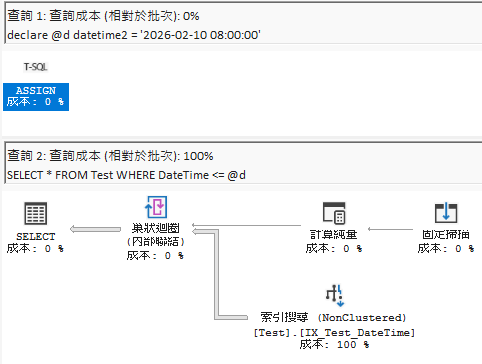
Of course, if you declare it as datetime2, this problem won't occur. But if the database type is datetime and the variable type is datetime2 (C# DateTime is usually treated as high precision when converted), this will cause performance issues.
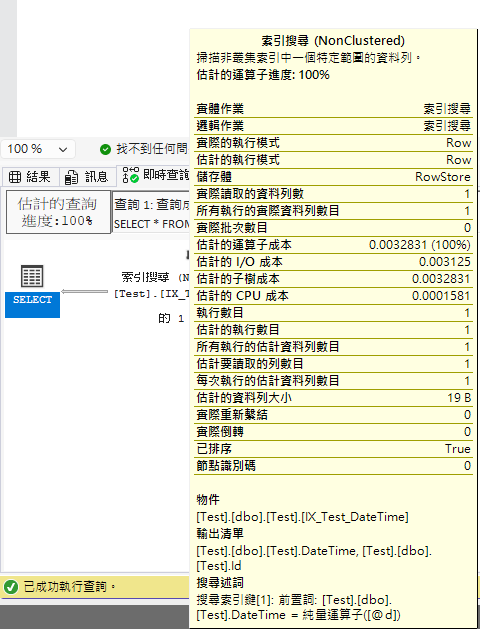
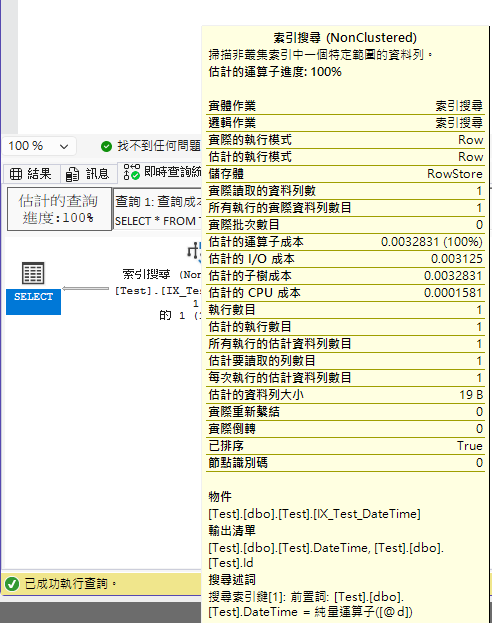
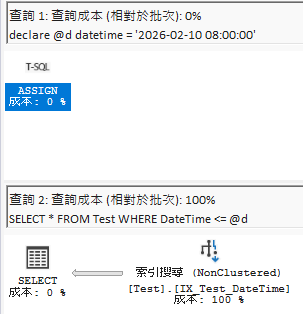
I did a quick test here; the execution plans for = look no different (SQL Server has special optimizations), but when running <=, the difference is obvious even to someone like me who doesn't understand execution plans.
Below is a comparison of execution plans for datetime2 parameters querying datetime columns:
When using = for comparison (both execution plans are the same, SQL Server has optimizations):
When using <= for comparison (you can see a clear difference):
However, unless you are manually maintaining SQL, whether it's Code First or reverse engineering, you shouldn't encounter type mismatches; this is more common when using Dapper or ADO.NET.
Of course, if you think using datetime2(7) as the database type will avoid this, I can only say that you will still step on landmines in certain scenarios.
If ADO.NET is not specially configured for Parameter types, DateTime defaults to datetime. That is, the situation of "declaring a datetime variable to query datetime2(7)" occurs: the same value, but the variable side rounds it, while the database side has the original value, so it cannot be found.
The article SQL DateTime Type Pitfalls by Darkthread has a test result, but he mentions in the article:
The reason is likely that Dapper handles @d as SQL DateTime type instead of DateTime2 during INSERT and WHERE processing, causing errors in the round-trip process.
More accurately, Dapper relies on ADO.NET at the bottom, so essentially it is still the ADO.NET type inference mechanism that causes this.
In other words, when using Entity Framework, unless the time precision is set to (7), this kind of AddTicks(-1) writing style will only cause misjudgments when using <= (including unexpected data from the next second).
If you are not using Entity Framework and you haven't set the Type, it is equally prone to problems. So the conclusion is: Just use < (less than) for range queries.
Change Log
- 2026-02-12 Initial document creation.