
A Brief Introduction to .NET Default Logger and Optimization Techniques
Sample Project
Executable sample for this article: CloudyWing/DotNetLoggingSample.
Log Levels
The following table defines the various levels and recommended usage scenarios based on Logging in C# and .NET. The None level has the highest value and is primarily used to completely disable all logs in Filter settings.
| Level | Value | Method | Description |
|---|---|---|---|
| Trace | 0 | LogTrace | Contains the most detailed messages. These messages may contain sensitive application data. They are disabled by default and should not be enabled in production. |
| Debug | 1 | LogDebug | Used for debugging and development. Use with caution in production due to high volume. |
| Information | 2 | LogInformation | Tracks general application flow. May have long-term value. |
| Warning | 3 | LogWarning | Used for handling abnormal or unexpected events. Usually contains errors or conditions that do not cause the application to fail. |
| Error | 4 | LogError | Unhandled errors and exceptions. These messages indicate a failure in the current operation or request, rather than a failure of the entire application. |
| Critical | 5 | LogCritical | Failures that require immediate attention. Examples: data loss, insufficient disk space. |
| None | 6 | N/A | Specifies that no messages should be written. |
Basic Injection Configuration
WebApplication.CreateBuilder() automatically configures the default Logger upon creation. By examining the .NET source code, specifically the AddDefaultServices() method in HostingHostBuilderExtensions.cs, we can see that the system automatically sets up basic Logger Providers:
// From .NET source code
services.AddLogging(logging => {
    bool isWindows =
#if NET
        OperatingSystem.IsWindows();
#elif NETFRAMEWORK
        Environment.OSVersion.Platform == PlatformID.Win32NT;
#else
        RuntimeInformation.IsOSPlatform(OSPlatform.Windows);
#endif

    // IMPORTANT: This needs to be added *before* configuration is loaded, this lets
    // the defaults be overridden by the configuration.
    if (isWindows) {
        // Default the EventLogLoggerProvider to warning or above
        logging.AddFilter<EventLogLoggerProvider>(level => level >= LogLevel.Warning);
    }

    logging.AddConfiguration(hostingContext.Configuration.GetSection("Logging"));
#if NET
    if (!OperatingSystem.IsBrowser() && !OperatingSystem.IsWasi())
#endif
    {
        logging.AddConsole();
    }
    logging.AddDebug();
    logging.AddEventSourceLogger();

    if (isWindows) {
        // Add the EventLogLoggerProvider on windows machines
        logging.AddEventLog();
    }

    logging.Configure(options => {
        options.ActivityTrackingOptions =
            ActivityTrackingOptions.SpanId |
            ActivityTrackingOptions.TraceId |
            ActivityTrackingOptions.ParentId;
    });
});This means that by default, WebApplication.CreateBuilder() has already configured the following Logger Providers for us:
- Reads settings from the "Logging" section of the Configuration.
- Console Logger (outputs to the console)
- Debug Logger (outputs to the debugger)
- EventSource Logger (used for EventSource tracing)
In practice, we can customize Logger settings as follows:
// CreateBuilder already has default settings
WebApplicationBuilder builder = WebApplication.CreateBuilder(args);

// You can adjust added LoggerProviders via DI
builder.Services.AddLogging(logging => {
    logging.ClearProviders(); // Clear default providers
    logging.AddConsole();     // Add Console Provider
    logging.AddDebug();       // Add Debug Provider
});

// Or simplify it directly like this
builder.Logging.ClearProviders();
builder.Logging.AddConsole();
builder.Logging.AddDebug();How to Inject Logger in Code
In ASP.NET Core, Logger is typically used via dependency injection. Here is a simplified example:
namespace LoggerTest.Controllers {
    [ApiController]
    [Route("api/[controller]")]
    public class UserController : ControllerBase {
        private readonly ILogger<UserController> logger;

        public UserController(ILogger<UserController> logger) {
            this.logger = logger;
            this.logger.LogInformation("UserController initialized");
        }
    }
}Controlling Log Levels Using Appsettings.json
We can configure log levels for different components via the appsettings.json file. Here is an example of a specific scenario using multiple types of Loggers:
namespace LoggerTest.Controllers {
    [ApiController]
    [Route("api/[controller]")]
    public class TestController : Controller {
        public TestController(ILogger<TestService1> logger1, ILogger<TestService2> logger2) {
            logger1.LogInformation("TestController successfully initialized and injected Service1's Logger.");
            logger2.LogInformation("TestController successfully initialized and injected Service2's Logger.");
        }
    }
}

namespace LoggerTest.Services {
    public class TestService1 {
        public TestService1() {
        }

        public void TestMethod() {
            // Do something
        }
    }

    public class TestService2 {
        public TestService2() {
        }

        public void TestMethod() {
            // Do something
        }
    }
}Combined with the following appsettings.json configuration:
{
  "Logging": {
    "LogLevel": {
      "Default": "Information",
      "Microsoft.AspNetCore": "Warning",
      "LoggerTest.Services.TestService1": "Warning"
    },
    "Debug": {
      "LogLevel": {
        "Default": "Information",
        "Microsoft.Hosting": "Trace"
      }
    },
    "EventSource": {
      "LogLevel": {
        "Default": "Warning"
      }
    }
  },
  "AllowedHosts": "*"
}In this configuration file:
- The outer "LogLevel" setting applies to all Logger Providers.
- Settings in the "Debug" and "EventSource" sections apply only to the specified Provider.
- "Default" indicates the default minimum log level.
- Specific namespaces like "Microsoft.AspNetCore" can have their own log levels set.
After running the program with the above settings, you will find that only Service2's logs are recorded, because Service1's log level is set to Warning.
info: Microsoft.Hosting.Lifetime[14]
      Now listening on: https://localhost:7109
info: Microsoft.Hosting.Lifetime[14]
      Now listening on: http://localhost:5164
info: Microsoft.Hosting.Lifetime[0]
      Application started. Press Ctrl+C to shut down.
info: Microsoft.Hosting.Lifetime[0]
      Hosting environment: Development
info: Microsoft.Hosting.Lifetime[0]
      Content root path: D:\Programming\Projects\LoggerTest\LoggerTest
info: LoggerTest.Services.TestService2[0]
TestController successfully initialized and injected Service2's Logger.Using Wildcards for Configuration
If you want to apply the same settings to multiple namespaces, you can use the wildcard *. For example, "*.Services": "Warning" will set the log level to Warning for all namespaces ending in .Services.
Advanced Filtering in Code
For more granular control, you can use Filters in your code:
// Filter by namespace
builder.Logging.AddFilter("Microsoft", LogLevel.Warning);

// Filter by provider type
builder.Logging.AddFilter<ConsoleLoggerProvider>("Microsoft", LogLevel.Warning);
builder.Logging.AddFilter<DebugLoggerProvider>("Microsoft.AspNetCore.Mvc", LogLevel.Debug);

// Use wildcards
builder.Logging.AddFilter("Microsoft.*", LogLevel.Warning);
builder.Logging.AddFilter("*.Repository", LogLevel.Debug);

// For a specific class logger
builder.Logging.AddFilter(typeof(Program).FullName, LogLevel.Debug);

// Use more granular control - functional filter
builder.Logging.AddFilter((provider, category, logLevel) => {
    // Show more detailed logs on weekdays
    if (DateTime.Now.DayOfWeek != DayOfWeek.Saturday
        && DateTime.Now.DayOfWeek != DayOfWeek.Sunday) {
        return logLevel >= LogLevel.Debug;
    }

    // Only show Warning and above on weekends
    return logLevel >= LogLevel.Warning;
});Improving Performance with Logger.IsEnabled
In cases where expensive operations are required to generate log messages, we can check if a specific log level is enabled first to avoid unnecessary computation:
if (logger.IsEnabled(LogLevel.Information)) {
    // Potentially resource-intensive operation here, e.g., database query or complex calculation
    int processedRecords = await database.GetProcessedRecordsCount();
    logger.LogInformation("System finished data update, processed {Count} records.", processedRecords);
}The benefit of this is that when the configuration file sets the log level to Warning or higher, we can completely skip these resource-intensive operations. Note that when changing log levels, remember to update the IsEnabled log level accordingly.
Advantages and Usage of Structured Logging
Main Benefits of Structured Logging
Performance Advantage: The biggest advantage of structured logging is avoiding unnecessary string concatenation operations. The Logger only performs string composition when it actually needs to write the log, which is known as "deferred execution." When the log level is set to not record certain levels, the associated string processing is never executed, thereby improving application performance.
Data Integration Convenience: Generated logs can be easily parsed by tools like Elasticsearch, Kibana, and Logstash (ELK), facilitating centralized log management.
How to Use Structured Logging
// Visual Studio and .NET analyzers will warn via CA2254 to avoid the following
logger.LogInformation(
    "User " + user.Id + " logged in, department: " + user.Department
);

// Correct structured logging approach
logger.LogInformation(
    "User {UserId} logged in, department: {Department}",
    user.Id,
    user.Department
);Special Usage of Curly Braces
If you need to include curly brace characters {} in your log message, you must use double curly braces to escape them. For example:
// If you want to output text containing curly braces, use double curly braces
logger.LogInformation("This is a JSON example: {{\"name\": \"value\"}}");

// Output result: This is a JSON example: {"name": "value"}

// Note: XXX in {XXX} is used as a variable placeholder, related to the parameter position
// It is not mapped by parameter name, but by parameter order
logger.LogInformation("Name: {Name}, Age: {Age}", "Xiao Ming", 25);
// Output: Name: Xiao Ming, Age: 25Outputting in JSON Format
By replacing AddConsole() with AddJsonConsole(), we can obtain structured JSON output:
builder.Logging.AddConsole();
// Change to
builder.Logging.AddJsonConsole();The generated JSON log format looks like this (formatted for readability):
{
    "EventId": 0,
    "LogLevel": "Information",
    "Category": "LoggerTest.Controllers.TestController",
    "Message": "User U12345 logged in, department: R&D",
    "State": {
        "UserId": "U12345",
        "Department": "R&D",
        "{OriginalFormat}": "User {UserId} logged in, department: {Department}"
    },
    "Timestamp": "2025-03-23T15:30:00.123Z"
}This structured JSON format is particularly suitable for integration with log analysis systems like ELK, allowing us to search, filter, and analyze logs more effectively. This is one of the main reasons why Serilog has gradually replaced NLog as the preferred .NET logging framework in recent years.
Using LoggerMessage.Define
Although the structured logging mentioned earlier avoids string concatenation, there are still two fixed costs during execution:
- Passed parameters are collected into an
object[]. If they are Value Types (e.g.,int,Guid), boxing occurs at this step. - Parsing of the Message template happens at runtime. Although
Microsoft.Extensions.Logginginternally usesConcurrentDictionaryto cacheLogValuesFormatterto avoid re-parsing every time, a dictionary lookup is still required upon calling, and aFormattedLogValuesobject is created.
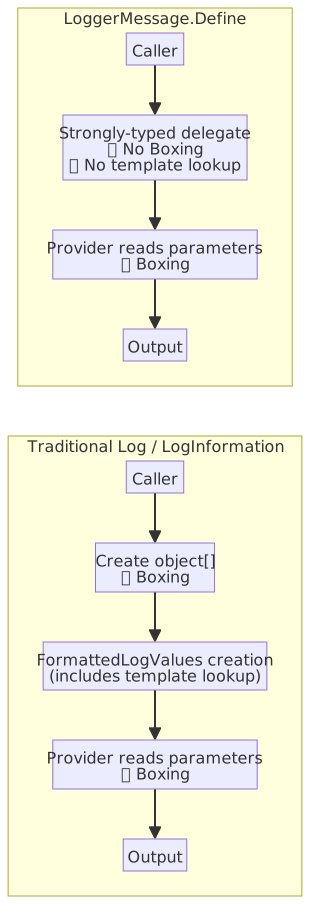
To address these two costs, .NET Core has provided the LoggerMessage.Define<T1, T2, ...> API since early versions. It uses generic methods to return a strongly-typed delegate Action<ILogger, T1, T2, ..., Exception?>. Passed parameters are carried through generic type parameters and are not collected into an object[], so no boxing occurs. The Message template is parsed at the moment Define is called, and the returned delegate applies it directly, so no runtime lookup is needed for subsequent calls.
Code example:
public class UserService {
    private readonly ILogger<UserService> logger;

    private static readonly Action<ILogger, string, string, Exception?> LogUserLoggedIn =
        LoggerMessage.Define<string, string>(
            LogLevel.Information,
            new EventId(1001, nameof(LogUserLoggedIn)),
            "User {UserId} logged in, department: {Department}"
        );

    public UserService(ILogger<UserService> logger) {
        this.logger = logger;
    }

    public void Login(User user) {
        LogUserLoggedIn(logger, user.Id, user.Department, null);
    }
}Cost comparison between the two approaches:
| Item | Traditional Log / LogInformation | LoggerMessage.Define |
|---|---|---|
Caller object[] allocation | Allocated every call | ✅ Not allocated |
| Caller Value Type Boxing | Yes | ✅ Eliminated |
| Message template processing | Runtime ConcurrentDictionary lookup + FormattedLogValues creation | ✅ Parsed once at Define |
| Boxing when reading parameters at output | Yes | Still occurs |
The diagram below compares the caller processing flow of the two approaches:
Using LoggerMessage Source Generator
While LoggerMessage.Define solves the caller's boxing cost, it is verbose to write, requiring a separate static delegate field, EventId, and type parameters for every message. Adding or adjusting placeholders later requires updating the Define<...> generic parameters, delegate type, and caller arguments. To automate this boilerplate, .NET 6 introduced the [LoggerMessage] syntactic sugar.
When using [LoggerMessage], you only need to declare the method as a partial method and add the attribute. The compile-time Source Generator will automatically fill in the corresponding static delegate, EventId, IsEnabled check, and call chain. It is more concise than Define, although it still involves a partial method declaration compared to calling Log / LogInformation directly.
Basic Example
LoggerMessage must be declared as a partial method, with the implementation filled in by the Source Generator at compile time. There are three ways for the Source Generator to obtain the ILogger:
- Mode 1: The method has no
ILoggerparameter. The Source Generator accesses theILoggerfield or property in the containing class as the log source (requires exactly oneILoggermember in the class). - Mode 2: The method has an
ILoggerparameter, but is not an extension method. Suitable for scenarios where there are multipleILoggerinstances in the class, or you want the caller to decide which logger to use. - Mode 3: The method is an extension method (
static, first parameter isthis ILogger). Placed in an independent static class, it can share the same logging logic across classes.
Mode 1: Method has no ILogger parameter, automatically uses class field
public partial class UserService {
    private readonly ILogger<UserService> logger;

    public UserService(ILogger<UserService> logger) {
        this.logger = logger;
    }

    public void Login(User user) {
        LogUserLoggedIn(user.Id, user.Department);
    }

    [LoggerMessage(
        EventId = 1001,
        Level = LogLevel.Information,
        Message = "User {UserId} logged in, department: {Department}"
    )]
    private partial void LogUserLoggedIn(string userId, string department);
}Mode 2: Method has ILogger parameter, not an extension method
public partial class OrderService {
    private readonly ILogger<OrderService> auditLogger;
    private readonly ILogger<OrderService> generalLogger;

    public OrderService(
        ILogger<OrderService> auditLogger,
        ILogger<OrderService> generalLogger) {
        this.auditLogger = auditLogger;
        this.generalLogger = generalLogger;
    }

    public void ProcessOrder(Order order) {
        // Caller decides which logger to use
        LogOrderProcessed(auditLogger, order.Id);
    }

    [LoggerMessage(
        EventId = 2001,
        Level = LogLevel.Information,
        Message = "Order {OrderId} processed"
    )]
    private partial void LogOrderProcessed(ILogger logger, string orderId);
}Mode 3: Method is an extension method, shared across classes
internal static partial class LoggerExtensions {
    [LoggerMessage(
        EventId = 3001,
        Level = LogLevel.Information,
        Message = "User {UserId} logged in"
    )]
    public static partial void LogUserLoggedIn(this ILogger logger, string userId);
}Naming Suggestions for partial methods
- Use verb phrases starting with
Logto describe "what happened," such asLogUserLoggedIn,LogOrderCreated,LogPaymentFailed. - Do not encode the LogLevel into the method name (e.g.,
LogInformationUserLoggedIn); the level is controlled by the attribute'sLevel, and naming should focus on event semantics. - Parameter names should match the
{Placeholder}in the Message to keep structured field names predictable.
What the Expanded Code Looks Like
The Source Generator will fill in the implementation for each partial method marked with [LoggerMessage]: it adds an IsEnabled check inside the method, then calls logger.Log<TState> using a strongly-typed state struct; it also generates a dedicated state struct for each method. For the three modes mentioned above, the main difference in the partial method body is "where the ILogger is obtained from," while the structure of the state struct is identical.
Taking Mode 1 as an example, the compiled code looks roughly like this (IEnumerable boilerplate and constructor assignments omitted):
private partial void LogUserLoggedIn(string userId, string department)
{
    // Return immediately if level doesn't match, avoiding subsequent state allocation
    if (!logger.IsEnabled(LogLevel.Information)) return;

    // Strongly-typed state passed directly to generic Log<TState>, no object[] in call path
    logger.Log(
        LogLevel.Information,
        new EventId(1001, nameof(LogUserLoggedIn)),
        new __State(userId, department),
        exception: null,
        __State.Format);
}

private readonly struct __State : IReadOnlyList<KeyValuePair<string, object?>>
{
    // Fields carry parameters in original types
    public readonly string _userId;
    public readonly string _department;
    // Constructor omitted: assigns construction parameters to fields above

    // Template parsed at compile time, static readonly delegate configured only once per program
    public static readonly Func<__State, Exception?, string> Format =
        (s, _) => $"User {s._userId} logged in, department: {s._department}";

    // Compile-time determined placeholder mapping for Provider to read structured fields
    public KeyValuePair<string, object?> this[int index] => index switch
    {
        0 => new("UserId", _userId),
        1 => new("Department", _department),
        2 => new("{OriginalFormat}", "User {UserId} logged in, department: {Department}"),
        _ => throw new ArgumentOutOfRangeException(nameof(index))
    };

    public int Count => 3;

    // GetEnumerator and other IEnumerable boilerplate omitted
}The __State role here is equivalent to the state inside the delegate returned by Define: fields carry parameters in strongly-typed form, there is no object[] allocation in the call path, and the Message template is parsed at compile time. The difference is that Define uses a generic method to produce an Action<...> delegate, while the Source Generator uses a custom struct paired with a formatter delegate. The principle of avoiding boxing is the same.
As seen in the expanded code, [LoggerMessage] has already added an IsEnabled check inside the partial method. Therefore, for resource-intensive log calls, there is no need to wrap them with an extra IsEnabled check; if the level does not match, subsequent delegate calls and state creation will not execute, also avoiding inconsistencies between IsEnabled and the log level.
Change Log
- 2025-03-23 Initial document creation.
- 2026-05-27 Added "Using LoggerMessage.Define" and "Using LoggerMessage Source Generator" sections, and included a link to the sample project.