
My Experience Troubleshooting "TheArtOfDev.HtmlRenderer.PdfSharp"
I recently encountered a requirement where, due to licensing issues with the free version of "iTextSharp," I began looking for other free PDF libraries. Ultimately, I chose "PDFsharp." However, since "PDFsharp" does not provide functionality to convert HTML strings to PDF, I found "TheArtOfDev.HtmlRenderer.PdfSharp" to use in conjunction with it. Although the last update for this package was "2015/5/6," there is a maintained version called "HtmlRenderer.PdfSharp.NetStandard2" which is developed using .NET Standard 2.1 and is not suitable for current .NET Framework projects. This article will not delve into how to use these two packages, as I only use the HTML-to-PDF functionality; instead, it will focus on listing the problems I encountered.
Package Introduction
- PDFsharp: A PDF library. The casing of this name is correct as written.
- HtmlRenderer.Core: This package is used to parse HTML elements and uses custom classes to store relevant information.
- HtmlRenderer.PdfSharp: Converts the objects defined by "HtmlRenderer.Core" into the information required by "PDFsharp" to generate a PDF.
Troubleshooting Journey
Attempting Execution
First, I followed the example provided in the README.md to execute the code:
PdfDocument pdf = PdfGenerator.GeneratePdf("<p><h1>Hello World</h1>This is html rendered text</p>", PageSize.A4);
pdf.Save("document.pdf");A problem occurred at the very first step... the following Exception was thrown:
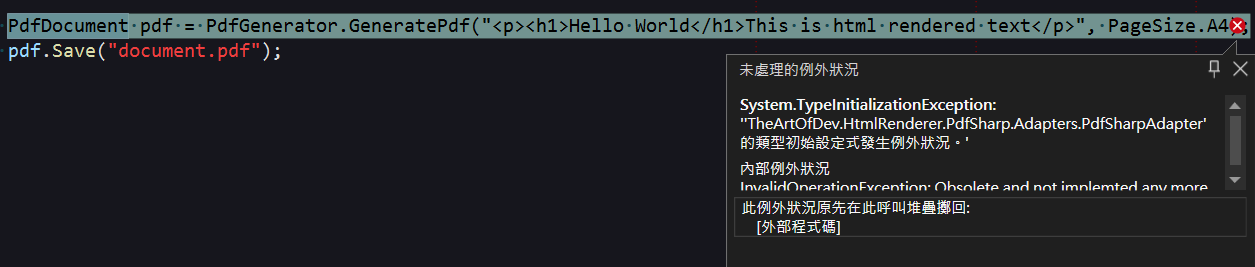
It felt like a version issue, so I tried downgrading the "TheArtOfDev.HtmlRenderer.PdfSharp" version, but the problem persisted. Since I couldn't find the issue in the source code, I downloaded it to debug and find the cause. However, after reconfiguring the references, I found that it wouldn't compile properly. After checking the project file (csproj), I discovered that compared to standard packages, it had the following extra settings:
  <Import Project="$(SolutionDir)\.nuget\NuGet.targets" Condition="Exists('$(SolutionDir)\.nuget\NuGet.targets')" />
  <Target Name="EnsureNuGetPackageBuildImports" BeforeTargets="PrepareForBuild">
    <PropertyGroup>
      <ErrorText>This project references NuGet package(s) that are missing on this computer. Enable NuGet Package Restore to download them.  For more information, see http://go.microsoft.com/fwlink/?LinkID=322105. The missing file is {0}.</ErrorText>
    </PropertyGroup>
    <Error Condition="!Exists('$(SolutionDir)\.nuget\NuGet.targets')" Text="$([System.String]::Format('$(ErrorText)', '$(SolutionDir)\.nuget\NuGet.targets'))" />
</Target>After removing the above settings related to NuGet restoration and rebuilding, the PDF was generated normally. This meant the code itself wasn't the problem; it really was a version configuration issue. Later, someone reminded me to try downgrading the "PDFsharp" version. After downgrading it to "1.32.3057," I finally succeeded in taking the first step =.=a.
Chinese Fonts
When trying to output Chinese, you might encounter issues where it doesn't display correctly, as shown below:
PdfDocument pdf = PdfGenerator.GeneratePdf("<p>中文</p>", PageSize.A4);
pdf.Save("document.pdf");
The solution is to add the CSS font-family in the HTML and set it to 標楷體 (BiauKai), which allows it to display correctly:
string html = @"
    <style>
        * {
            font-family: 標楷體;
        }
    </style>
    <p>中文</p>
";
PdfDocument pdf = PdfGenerator.GeneratePdf(html, PageSize.A4);
pdf.Save("document.pdf");
TIP
- Among the default fonts, only "標楷體" (BiauKai) and "Malgun Gothic" can display Chinese correctly.
- In a Windows English environment, please change "標楷體" to "DFKai-SB". Conversely, do not use "DFKai-SB" in a Chinese environment.
Truncated Tables
In the following scenarios, the bottom border of a <table> might be truncated:
- Using nested
<table>elements. - The
<td>element of the inner<table>has a specifiedheightattribute that exceeds a certain number, while the height of the elements inside the<td>does not exceed the<td>itself. - The inner
<table>has borders set. It is difficult to determine if there is a problem when borders are not set, as truncation cannot be identified through borders, but I have not yet observed cases where<td>content is truncated.
The following is a demonstration case:
string rowsHtml = "";
for (int i = 0; i < 5; i++) {
    rowsHtml += $"<tr><td>Text{i}0</td><td>Text{i}1</td><td>Text{i}2</td></tr>";
}

string html = $@"
    <style>
        table.list, table.list td {{
            border-collapse: collapse;
            border: 1xp solid black;
        }}
        td {{
            height: 30px;
        }}
    </style>
    <html>
    <body>
        <table>
            <tr>
                <td>
                    <table class=""list"">
                        {rowsHtml}
                    </table>
                </td>
            </td>
        </table>
    </body>
    </html>
";

PdfDocument pdf = PdfGenerator.GeneratePdf(html, PageSize.A4);
pdf.Save("document.pdf");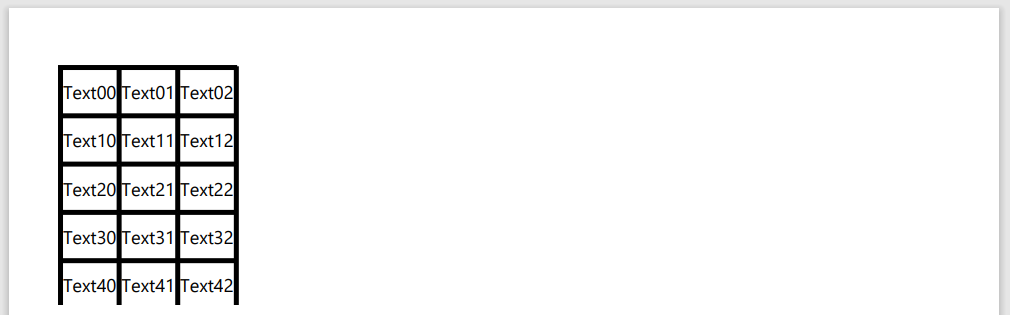
I suspect the problem lies in the calculation of element heights, where the outer <td> height is calculated incorrectly, causing the inner <table> to exceed the bounds of the outer <td>. I haven't found a proper solution yet, so I can only add an extra <tr> at the end and set the height attribute of the <td> below to 0px initially. If the border is still truncated, I gradually increase the height attribute value in increments of 0.5px until I find a value that displays correctly without adding extra border height. However, there is a chance that the top border of the inner <table> might get cut off; if that happens, I add an extra <tr> at the beginning and handle it in the same way. Here is an example:
string rowsHtml = "";
for (int i = 0; i < 5; i++) {
    rowsHtml += $"<tr><td>Text{i}0</td><td>Text{i}1</td><td>Text{i}2</td></tr>";
}

string html = $@"
    <style>
        table.list, table.list td {{
            border-collapse: collapse;
            border: 1xp solid black;
        }}
        td {{
            height: 30px;
        }}
    </style>
    <html>
    <body>
        <table>
            <tr>
                <td>
                    <table class=""list"">
                        {rowsHtml}
                        <!--Extra tr added-->
                        <tr>
                            <td colspan=""3"" style=""height: 9px;""></td>
                        <tr>
                    </table>
                </td>
            </td>
        </table>
    </body>
    </html>
";

PdfDocument pdf = PdfGenerator.GeneratePdf(html, PageSize.A4);
pdf.Save("document.pdf");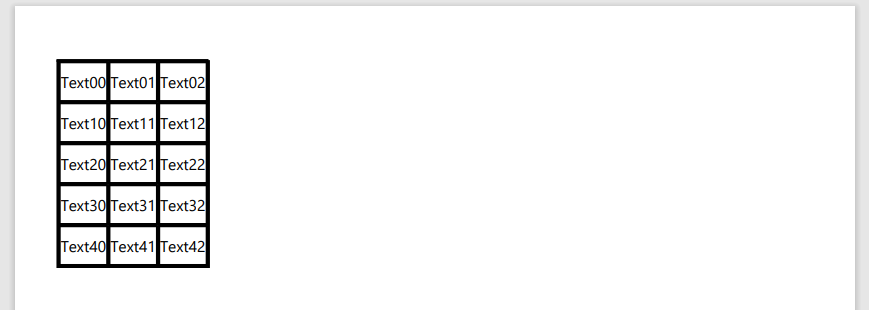
Final Thoughts
Regarding the functionality of converting HTML to PDF, the styling in "TheArtOfDev.HtmlRenderer.PdfSharp" is more complete than in "iTextSharp." During the process of switching libraries, I frequently found that the styling performance was not as expected because some CSS styles that didn't work in "iTextSharp" took effect in "TheArtOfDev.HtmlRenderer.PdfSharp," thereby affecting the parts I was currently working on.
It is worth noting that in some cases that do not conform to standard HTML structure, determining which rendering result is closer to the browser's effect is relatively complex. For example, in the case of placing an <hr /> inside a <td> element, current versions of Chrome accept this structure, and the "iTextSharp" result shows a horizontal line inside the <td>. When using "TheArtOfDev.HtmlRenderer.PdfSharp," the display position of the horizontal line might be off.
As for "HtmlRenderer.PdfSharp.NetStandard2," since I haven't used it, I will not offer an opinion here.
Change Log
- 2023-12-05 Initial document created.