
在 ASP.NET Core Web API 中實現可選更新功能
之前我一直無法理解 RESTful 的 PATCH 要如何實現。雖然我曾經嘗試使用 null 來區分是否要更新某個欄位,但這樣的做法只能適用於字串型別,因為在資料庫中,我會選擇存空字串。因此,只能將欄位的值更新為空字串,而不會將其更新為 null。不過,對於像 DateTime 這類的 struct 型別,當資料庫允許 null 值時,就會遇到無法辨識應該忽略欄位還是將其存儲為 null 的問題。
我是不清楚業界的普遍處理方式,我能想到的做法是前後端約定某個特定值來代表不更新該欄位,或者增加一個註記欄位來辨識是否需要進行更新。我個人比較偏好後者的方案。
我的想法是由後端來處理這個註記,而前端則依據是否傳遞指定屬性來判斷是否進行更新。這樣不論是需要可選更新還是必須傳入的屬性,都不會影響到資料結構。
要完成我的想法,需要針對以下幾個方面進行處理:
- 代表可選屬性的 struct 型別。
- 如果資料來源是
[FromBody],則需撰寫該型別的JsonConverter。 - 如果資料來源是
[FromForm],則需撰寫該型別的ModelBinder。 - Data Annotation 的驗證不是針對該型別,因此需撰寫
ValueValidator來處理。 - 因為客製化型別處理,所以 Swagger 需要調整產生的
swagger.json。
以下將分別說明。
可選屬性型別
建立該型別的 struct。這邊使用 struct,而非 class,是因為不需要 null 值。此外,當未設置值時,屬性的預設值會是 OptionalValue<T>() ,而不是 null,這樣能簡化需要處理的判斷邏輯。
public readonly record struct OptionalValue<T> {
    private readonly T value;

    public OptionalValue(T value) {
        HasValue = true;
        this.value = value;
    }

    public static OptionalValue<T> Empty() => new();

    [ValidateNever]
    public bool HasValue { get; }

    [ValidateNever]
    public T Value {
        get {
            if (!HasValue) {
                throw new InvalidOperationException("OptionalValue object must have a value.");
            }
            return value;
        }
    }

    public static implicit operator OptionalValue<T>(T value) {
        return new OptionalValue<T>(value);
    }

    public static explicit operator T(OptionalValue<T> value) {
        return value.Value;
    }
}Input DTO 的範例如下:
public class Input {
    [Required]
    public OptionalValue<string> String1 { get; set; }

    [Required]
    public OptionalValue<string?> String2 { get; set; }

    [Required]
    [Range(0, 3)]
    public OptionalValue<int> Int1 { get; set; }

    [Required]
    [Range(0, 3)]
    public OptionalValue<int?> Int2 { get; set; }
}FromBody 的 JsonConverter
針對 OptionalValue<T> 的 JSON 序列化處理,將序列化的結果從:
{
  "string1": {
    "hasValue": true,
    "value": "Value"
  },
  "string2": {
    "hasValue": false,
    "value": null
  }
}變更為:
{
  "string1": "Value"
}自定義 JsonConverter
以下是自定義的 JsonConverter 實作:
public class OptionalValueConverter<T> : JsonConverter<OptionalValue<T>> {
    public override OptionalValue<T> Read(ref Utf8JsonReader reader, Type typeToConvert, JsonSerializerOptions options) {
        if (reader.TokenType == JsonTokenType.None) {
            return OptionalValue<T>.Empty();
        } else {
            T? value = JsonSerializer.Deserialize<T>(ref reader, options);

            if (value is null && typeof(T).IsValueType && Nullable.GetUnderlyingType(typeof(T)) is null) {
                throw new JsonException($"Null value is not allowed for non-nullable type {typeof(T)}.");
            }

            return new OptionalValue<T>(value!);
        }
    }

    public override void Write(Utf8JsonWriter writer, OptionalValue<T> value, JsonSerializerOptions options) {
        if (value.HasValue) {
            JsonSerializer.Serialize(writer, value.Value, options);
        }
    }
}JsonConverterFactory
因為自定義的 JsonConverter 是泛型型別,所以需要再寫 JsonConverterFactory:
public class OptionalValueJsonConverterFactory : JsonConverterFactory {
    public override bool CanConvert(Type typeToConvert) {
        return typeToConvert.IsGenericType && typeToConvert.GetGenericTypeDefinition() == typeof(OptionalValue<>);
    }

    public override JsonConverter? CreateConverter(Type typeToConvert, JsonSerializerOptions options) {
        Type type = typeToConvert.GetGenericArguments()[0];
        Type converterType = typeof(OptionalValueConverter<>).MakeGenericType(type);
        return Activator.CreateInstance(converterType) as JsonConverter;
    }
}註冊 JsonConverterFactory
在 Program.cs 中加入 OptionalValueJsonConverterFactory 的註冊:
builder.Services.AddControllers()
    .AddJsonOptions(opts => {
        opts.JsonSerializerOptions.Converters.Add(new OptionalValueJsonConverterFactory());
});FromForm 的 ModelBinder
針對 OptionalValue<T> 的資料繫結處理,將接收到的格式從以下形式:
string1.hasValue=true
string1.value=Value
string2.hasValue=false
string2.value=簡化成:
string1=Value自定義 ModelBinder
以下是 OptionalValueModelBinder 的實作:
public class OptionalValueModelBinder<T> : IModelBinder {
    public Task BindModelAsync(ModelBindingContext bindingContext) {
        ValueProviderResult valueProviderResult = bindingContext.ValueProvider.GetValue(bindingContext.ModelName);

        if (valueProviderResult == ValueProviderResult.None) {
            bindingContext.Result = ModelBindingResult.Success(OptionalValue<T>.Empty());
            return Task.CompletedTask;
        }

        string? valueStr = valueProviderResult.FirstValue;
        Type targetType = Nullable.GetUnderlyingType(typeof(T)) ?? typeof(T);
        bool isNullable = targetType == typeof(T);

        try {
            // 理論上 FromForm 不用處理 null,但還是加減處理一下
            if (string.IsNullOrEmpty(valueStr)) {
                if (isNullable || (!targetType.IsValueType && valueStr is null)) {
                    bindingContext.Result = ModelBindingResult.Success(new OptionalValue<T?>(default));
                    return Task.CompletedTask;
                }

                if (targetType.IsValueType) {
                    bindingContext.ModelState.AddModelError(bindingContext.ModelName, $"The value '{valueStr}' is invalid.");
                    return Task.CompletedTask;
                }
            }

            TypeConverter converter = TypeDescriptor.GetConverter(targetType);
            object? convertedValue = null;

            if (converter.CanConvertFrom(typeof(string))) {
                convertedValue = converter.ConvertFrom(valueStr!);
            } else {
                convertedValue = Convert.ChangeType(valueStr, targetType);
            }

            bindingContext.Result = ModelBindingResult.Success(new OptionalValue<T>((T)convertedValue!));
        } catch {
            bindingContext.ModelState.AddModelError(bindingContext.ModelName, $"The value '{valueStr}' is invalid.");
        }

        return Task.CompletedTask;
    }
}ModelBinderProvider
為了能夠將 OptionalValue<T> 類型與相對應的 ModelBinder 綁定,實作了 OptionalValueModelBinderProvider:
public class OptionalValueModelBinderProvider : IModelBinderProvider {
    public IModelBinder? GetBinder(ModelBinderProviderContext context) {
        Type modelType = context.Metadata.ModelType;

        if (modelType.IsGenericType && modelType.GetGenericTypeDefinition() == typeof(OptionalValue<>)) {
            Type valueType = modelType.GetGenericArguments()[0];
            Type binderType = typeof(OptionalValueModelBinder<>).MakeGenericType(valueType);

            return Activator.CreateInstance(binderType) as IModelBinder;
        }

        return null;
    }
}註冊 ModelBinderProvider
在 Program.cs 中註冊 OptionalValueModelBinderProvider,以便 ASP.NET Core 在處理來自表單的請求時能正確使用此綁定器:
builder.Services.AddControllers(options => {
    options.ModelBinderProviders.Insert(0, new OptionalValueModelBinderProvider());
});處理資料驗證
為了讓 OptionalValue<T> 上設定的 ValidationAttribute 能夠使用 Value 屬性進行驗證,我們需要自定義一個實現 IModelValidator 的驗證器。這個驗證器的邏輯如下:
- 當
HasValue屬性為false時,將忽略驗證。 - 當
HasValue為true時,則使用Value屬性進行相應的驗證。
自定義 OptionalValueValidator
以下是 OptionalValueValidator<T> 的實作範例:
public class OptionalValueValidator<T> : IModelValidator {
    private readonly ValidatorItem validatorItem;

    public OptionalValueValidator(ValidatorItem validatorItem) => this.validatorItem = validatorItem ?? throw new ArgumentNullException(nameof(validatorItem));

    public IEnumerable<ModelValidationResult> Validate(ModelValidationContext context) {
        if (context.Model is OptionalValue<T> optionalValue) {
            if (optionalValue.HasValue) {
                List<ModelValidationResult> results = [];
                if (validatorItem.ValidatorMetadata is IModelValidator modelValidator) {
                    results.AddRange(modelValidator.Validate(context));
                } else if (validatorItem.ValidatorMetadata is ValidationAttribute attribute) {
                    ValidationContext validationContext = new(context.Model) {
                        DisplayName = context.ModelMetadata.GetDisplayName(),
                        MemberName = context.ModelMetadata.PropertyName
                    };

                    if (!attribute.IsValid(optionalValue.Value)) {
                        results.Add(new ModelValidationResult("", attribute.FormatErrorMessage(validationContext.DisplayName)));
                    }
                }

                foreach (ModelValidationResult validationResult in results) {
                    yield return new ModelValidationResult(validationResult.MemberName, validationResult.Message);
                }
            }

        }
    }
}OptionalValueModelValidatorProvider
以下是 OptionalValueModelValidatorProvider 的實作,負責為 OptionalValue<T> 型別建立驗證器:
public class OptionalValueModelValidatorProvider : IModelValidatorProvider {
    public void CreateValidators(ModelValidatorProviderContext context) {
        bool isOptionalValueType = context.ModelMetadata.ModelType.IsGenericType
            && context.ModelMetadata.ModelType.GetGenericTypeDefinition() == typeof(OptionalValue<>);

        for (int i = 0; i < context.Results.Count; i++) {
            ValidatorItem validatorItem = context.Results[i];

            if (isOptionalValueType) {
                Type valueType = context.ModelMetadata.ModelType.GetGenericArguments()[0];
                Type validatorType = typeof(OptionalValueValidator<>).MakeGenericType(valueType);

                validatorItem.Validator = Activator.CreateInstance(validatorType, validatorItem) as IModelValidator;
                validatorItem.IsReusable = true;
            }
        }
    }
}註冊 OptionalValueModelValidatorProvider
最後,在 Program.cs 中註冊 OptionalValueModelValidatorProvider 以使驗證器能夠被 ASP.NET Core 應用程式使用:
builder.Services.AddControllers(opts => {
    opts.ModelValidatorProviders.Insert(0, new OptionalValueModelValidatorProvider());
})處理 Swagger Schema
因為有客製化 JsonConverter 和 ModelBinder,為了在 Swagger 文件中正確顯示調整後的結果,需要實作兩個 Filter:OptionalValueSchemaFilter 和 OptionalValueOperationFilter。這些 Filter 負責修改產出的 swagger.json 的型別和參數,使其能夠符合 OptionalValue 的設計。
OptionalValueSchemaFilter
OptionalValueSchemaFilter 主要用於在 Swagger 的 Schema 中,在 [FromBody] 的情況下,將 OptionalValue<T> 型別的顯示方式調整為只顯示其 Value 屬性。以下是實作範例:
public class OptionalValueSchemaFilter : ISchemaFilter {
    public void Apply(OpenApiSchema schema, SchemaFilterContext context) {
        if (context.Type.IsGenericType && context.Type.GetGenericTypeDefinition() == typeof(OptionalValue<>)) {
            schema.Type = schema.Properties["value"].Type;
            schema.Properties.Clear();
        }
    }
}OptionalValueOperationFilter
OptionalValueOperationFilter 用於調整 [FromForm] 的請求的參數。以下是該類別的實作範例:
public class OptionalValueOperationFilter : IOperationFilter {
    public void Apply(OpenApiOperation operation, OperationFilterContext context) {
        IList<ApiParameterDescription> parameters = context.ApiDescription.ParameterDescriptions;

        if (operation.RequestBody.Content.TryGetValue("multipart/form-data", out OpenApiMediaType? mediaType)) {
            IDictionary<string, OpenApiSchema> properties = mediaType.Schema.Properties;
            IDictionary<string, OpenApiEncoding> encoding = mediaType.Encoding;

            foreach (ApiParameterDescription parameter in parameters) {
                if (parameter.Source == BindingSource.Form
                    && parameter.ModelMetadata.ContainerType?.IsGenericType == true
                    && parameter.ModelMetadata.ContainerType.GetGenericTypeDefinition() == typeof(OptionalValue<>)
                ) {
                    if (parameter.Name.EndsWith(".HasValue")) {
                        string keyToRemove = parameter.Name;

                        if (properties.ContainsKey(keyToRemove)) {
                            properties.Remove(keyToRemove);
                        }

                        if (encoding.ContainsKey(keyToRemove)) {
                            encoding.Remove(keyToRemove);
                        }
                    }

                    if (parameter.Name.EndsWith(".Value")) {
                        string keyToModify = parameter.Name;
                        string newKey = keyToModify.Replace(".Value", "");

                        if (properties.TryGetValue(keyToModify, out OpenApiSchema? schema)) {
                            properties.Remove(keyToModify);
                            properties.Add(newKey, schema);

                            RequiredAttribute? requiredAttribute = parameter.ParameterDescriptor.ParameterType
                                .GetProperty(newKey)?
                                .GetCustomAttributes<RequiredAttribute>(false)
                                .FirstOrDefault();

                            if (requiredAttribute != null && !schema.Required.Contains(newKey)) {
                                // 有加這行,Swagger 才會顯示必填,但就無法做到沒填值的情境
                                //mediaType.Schema.Required.Add(newKey);
                            }
                        }

                        if (encoding.TryGetValue(keyToModify, out OpenApiEncoding? apiEncoding)) {
                            encoding.Remove(keyToModify);
                            encoding.Add(newKey, apiEncoding);
                        }
                    }
                }
            }
        }
    }
}TIP
我這邊是將 [FromBody] 的處理寫在 OptionalValueSchemaFilter,但 OptionalValueOperationFilter 調整後,可能也能支援 [FromBody] 的處理。
註冊 Swagger Filter
將這兩個 Filter 註冊到 Swagger 的服務中,以確保它們在產生 swagger.json 時生效:
builder.Services.AddSwaggerGen(opts => {
    opts.SchemaFilter<OptionalValueSchemaFilter>();
    opts.OperationFilter<OptionalValueOperationFilter>();
});產生出來 swagger.json 相關內容如下:
{
  "paths": {
    "/Test/Test1": {
      "post": {
        "tags": [
          "Test"
        ],
        "requestBody": {
          "content": {
            "application/json": {
              "schema": {
                "$ref": "#/components/schemas/Input"
              }
            },
            "text/json": {
              "schema": {
                "$ref": "#/components/schemas/Input"
              }
            },
            "application/*+json": {
              "schema": {
                "$ref": "#/components/schemas/Input"
              }
            }
          }
        },
        "responses": {
          "200": {
            "description": "Success"
          }
        }
      }
    },
    "/Test/Test2": {
      "post": {
        "tags": [
          "Test"
        ],
        "requestBody": {
          "content": {
            "multipart/form-data": {
              "schema": {
                "type": "object",
                "properties": {
                  "String1": {
                    "type": "string"
                  },
                  "String2": {
                    "type": "string"
                  },
                  "Int1": {
                    "type": "integer",
                    "format": "int32"
                  },
                  "Int2": {
                    "type": "integer",
                    "format": "int32"
                  }
                }
              },
              "encoding": {
                "String1": {
                  "style": "form"
                },
                "String2": {
                  "style": "form"
                },
                "Int1": {
                  "style": "form"
                },
                "Int2": {
                  "style": "form"
                }
              }
            }
          }
        },
        "responses": {
          "200": {
            "description": "Success"
          }
        }
      }
    }
  },
  "components": {
    "schemas": {
      "Input": {
        "required": [
          "int1",
          "int2",
          "string1",
          "string2"
        ],
        "type": "object",
        "properties": {
          "string1": {
            "$ref": "#/components/schemas/StringOptionalValue"
          },
          "string2": {
            "$ref": "#/components/schemas/StringOptionalValue"
          },
          "int1": {
            "$ref": "#/components/schemas/Int32OptionalValue"
          },
          "int2": {
            "$ref": "#/components/schemas/Int32NullableOptionalValue"
          }
        },
        "additionalProperties": false
      },
      "Int32NullableOptionalValue": {
        "type": "integer",
        "additionalProperties": false
      },
      "Int32OptionalValue": {
        "type": "integer",
        "additionalProperties": false
      },
      "StringOptionalValue": {
        "type": "string",
        "additionalProperties": false
      }
    }
  }
}執行結果
使用以下程式碼進行測試:
[ApiController]
[Route("[controller]/[action]")]
public class TestController : ControllerBase {
    private readonly ILogger<TestController> _logger;

    public TestController(ILogger<TestController> logger) {
        _logger = logger;
    }

    [HttpPost]
    public void Test1([FromBody] Input forecast) {

    }

    [HttpPost]
    public void Test2([FromForm] Input forecast) {

    }

    [HttpPost]
    public void Test3([FromForm] Input2 forecast) {

    }
}FromBody 結果
如果未傳入任何屬性。
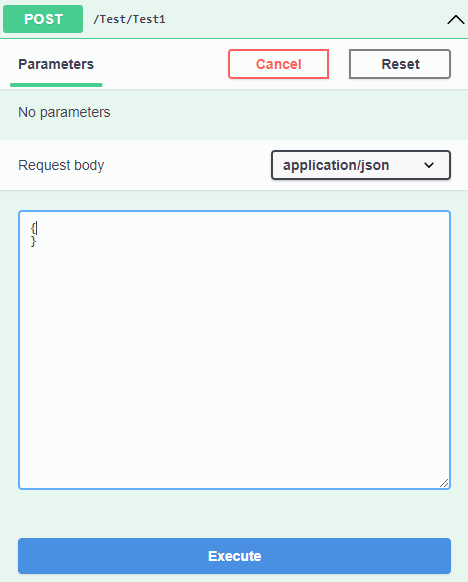
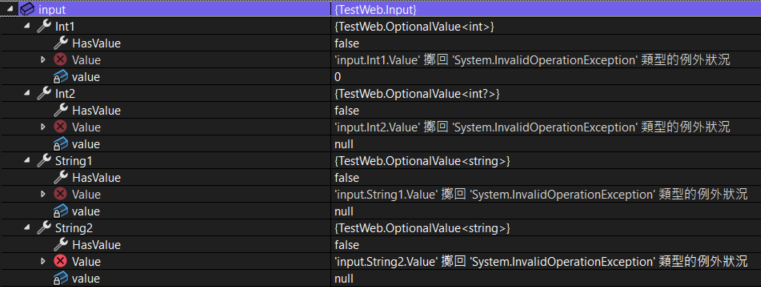
驗證可以通過,但是得到的會是 OptionalValue<T>.Empty。
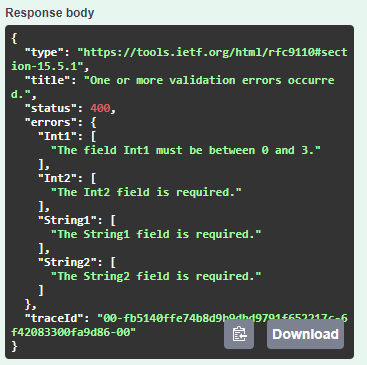
如果有傳入屬性,但值無效。
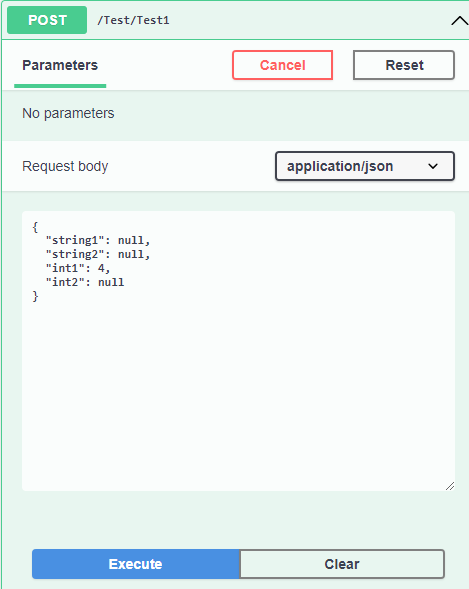
則會進行驗證。
如果傳入有效值。
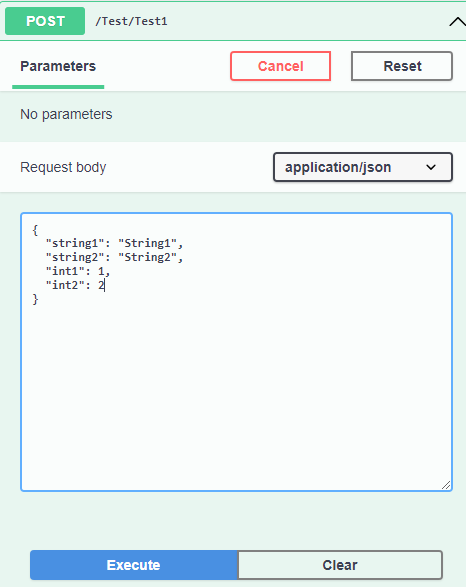
則可以得到有值的 OptionalValue<T>。
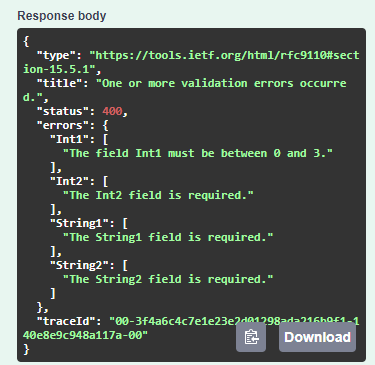
FromForm 結果
如果未輸入任何值。
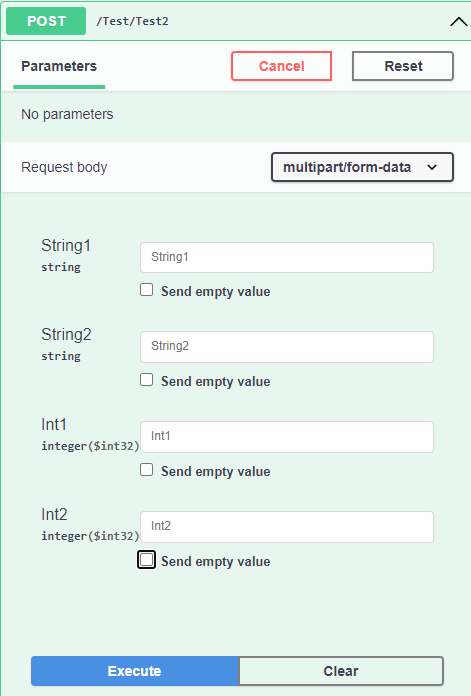
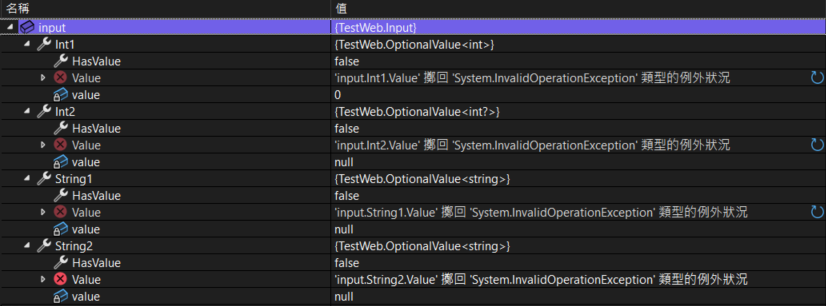
驗證可以通過,但是得到的會是 OptionalValue<T>.Empty。
如果輸入空值或無效值。
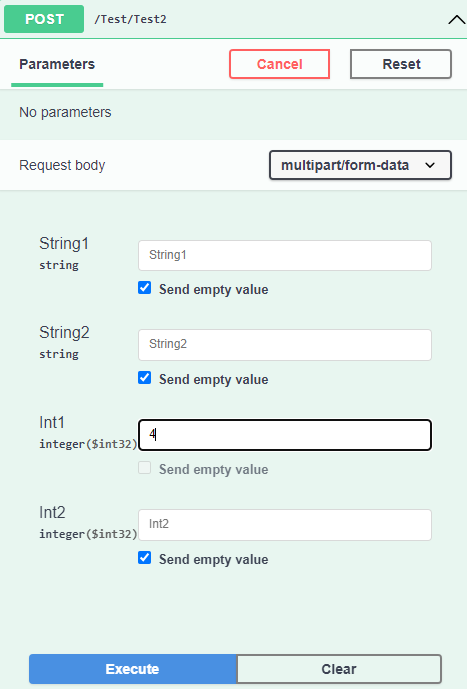
則會進行驗證。
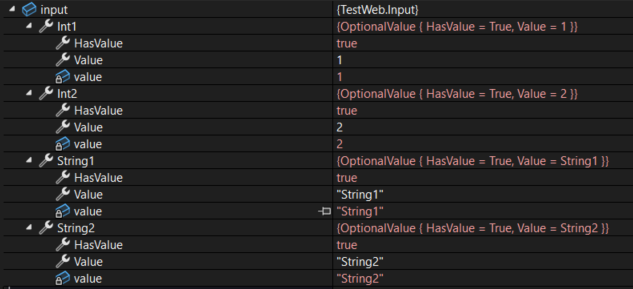
如果傳入有效值。
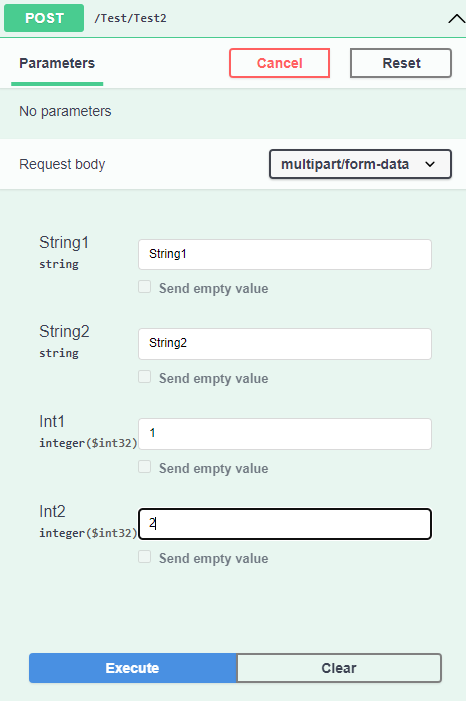
則可以得到有值的 OptionalValue<T>。
異動歷程
- 2024-10-21 初版文件建立。