
Setting Table Descriptions using SQL Server Management Studio
TLDR
- Setting table descriptions (Extended Properties) facilitates database documentation and supports development tools in generating Schema documentation.
- When using the SSMS graphical interface, it is recommended to avoid multi-line descriptions to prevent Entity Framework reverse engineering from generating code that fails to compile.
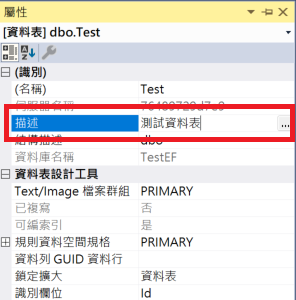
- In addition to the 'Extended Properties' page, descriptions can also be edited directly in the Properties window of the 'Table Designer'.
- You can use the
sp_addextendedpropertyandsp_updateextendedpropertystored procedures to add, delete, or modify descriptions via SQL commands.
SSMS Graphical Interface Configuration
In SQL Server Management Studio (SSMS), there are two main graphical interface methods for setting table descriptions.
Setting via Table Properties
When to use this: When you need to add a description to an existing table and prefer using the UI.
- In SSMS, right-click the target table and select "Properties".
- Go to the "Extended Properties" page.
- Add a property named
MS_Descriptionand enter the description content in the value field.
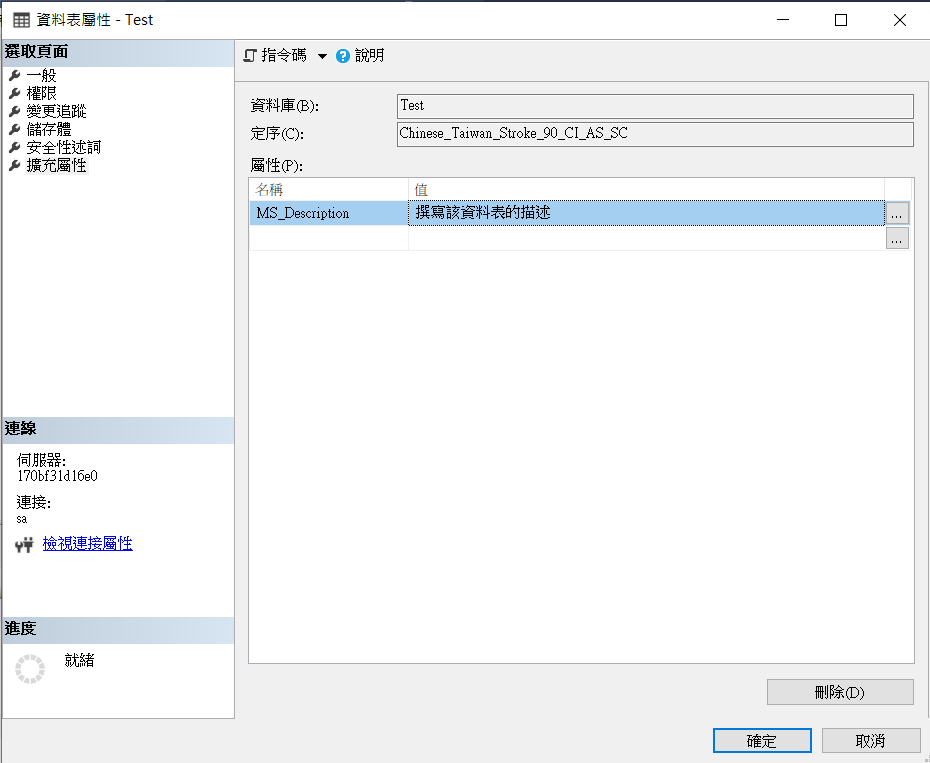
WARNING
Although the multi-line editing window (the three-dot button) is convenient, if you intend to use Entity Framework for reverse engineering later, please avoid using multi-line descriptions, as this may cause the generated code to fail to compile.
Setting via Table Designer
When to use this: When you are adjusting columns in the Table Designer and want to quickly update the table description simultaneously.
You can find the description field to edit directly in the Properties window of the Table Designer.
Editing via SQL Syntax
When to use this: When you need to process multiple tables in batches or automate database documentation updates within a CI/CD pipeline.
Adding a Table Description
Use the sp_addextendedproperty stored procedure to add a description:
EXECUTE sp_addextendedproperty @name = N'MS_Description', @value = N'{Table Description}', @level0type = N'SCHEMA', @level0name = N'dbo', @level1type = N'TABLE', @level1name = N'{Table Name}';Modifying a Table Description
If the description already exists, you must use sp_updateextendedproperty to update it:
EXECUTE sp_updateextendedproperty @name = N'MS_Description', @value = N'{Table Description}', @level0type = N'SCHEMA', @level0name = N'dbo', @level1type = N'TABLE', @level1name = N'{Table Name}';Change Log
- 2024-07-15 Initial documentation created.
- 2024-08-23 Added the second SSMS configuration method.