
Generating Audio Files with Google AI Studio
Since ChatGPT 5 was not very intuitive to use, I switched to the Gemini 3 camp after the release of the Gemini 3 AI model. Coincidentally, my new phone came with a Google One Pro subscription. In December, I also discovered that Claude Desktop added a built-in Claude Code feature on November 25th, so I spent the entire month researching the various features of Claude Code and Gemini. Since Claude Code on Desktop still has many issues, I have primarily focused on researching Gemini's features.
Because my English is poor, I often mispronounced words and was corrected. I previously bought a book called "English Usage Guidelines for Software Engineers," but I still didn't know how to pronounce the words after reading it. So, I wanted to have Gemini generate some common vocabulary for me and then feed it into Google AI Studio to generate audio files so I could listen to how they are pronounced.
Introduction
When people talk about Google's AI tools, the first thing that comes to mind is usually Gemini. However, to generate audio files, you need to use another tool: Google AI Studio (hereinafter referred to as AI Studio). The following explains the positioning differences between the two (if you are already familiar with this, you can skip directly to the Operating Procedure):
Tool Positioning and Functionality
- Gemini: A personal digital assistant with a more intuitive and user-friendly interface. It integrates with services like Google Drive and Gmail, making it suitable for daily tasks.
- AI Studio: A developer workstation that provides professional parameter control and advanced features like Generate speech.
Billing Model (Billed Separately)
- Gemini: Available in a free plan; advanced features are subscription-based with a fixed monthly fee.
- AI Studio: Free quota + pay-as-you-go; there is a daily free quota during the development and testing phase.
Data Privacy Differences (Important)
- Gemini: By default, conversation data is used to train the model. You must manually turn off "Activity History" to protect privacy (though you will lose the conversation history feature).
- AI Studio: Data under the free quota is used for training. To ensure privacy, you must set up a billing project. In this mode, the input data will never be used for training.
WARNING
If you are handling sensitive content or are concerned about privacy, it is recommended to set up a billing project in AI Studio.
Operating Procedure
After understanding the differences between the two, the following explains how to use the Generate speech tool in AI Studio to convert text into realistic AI speech.
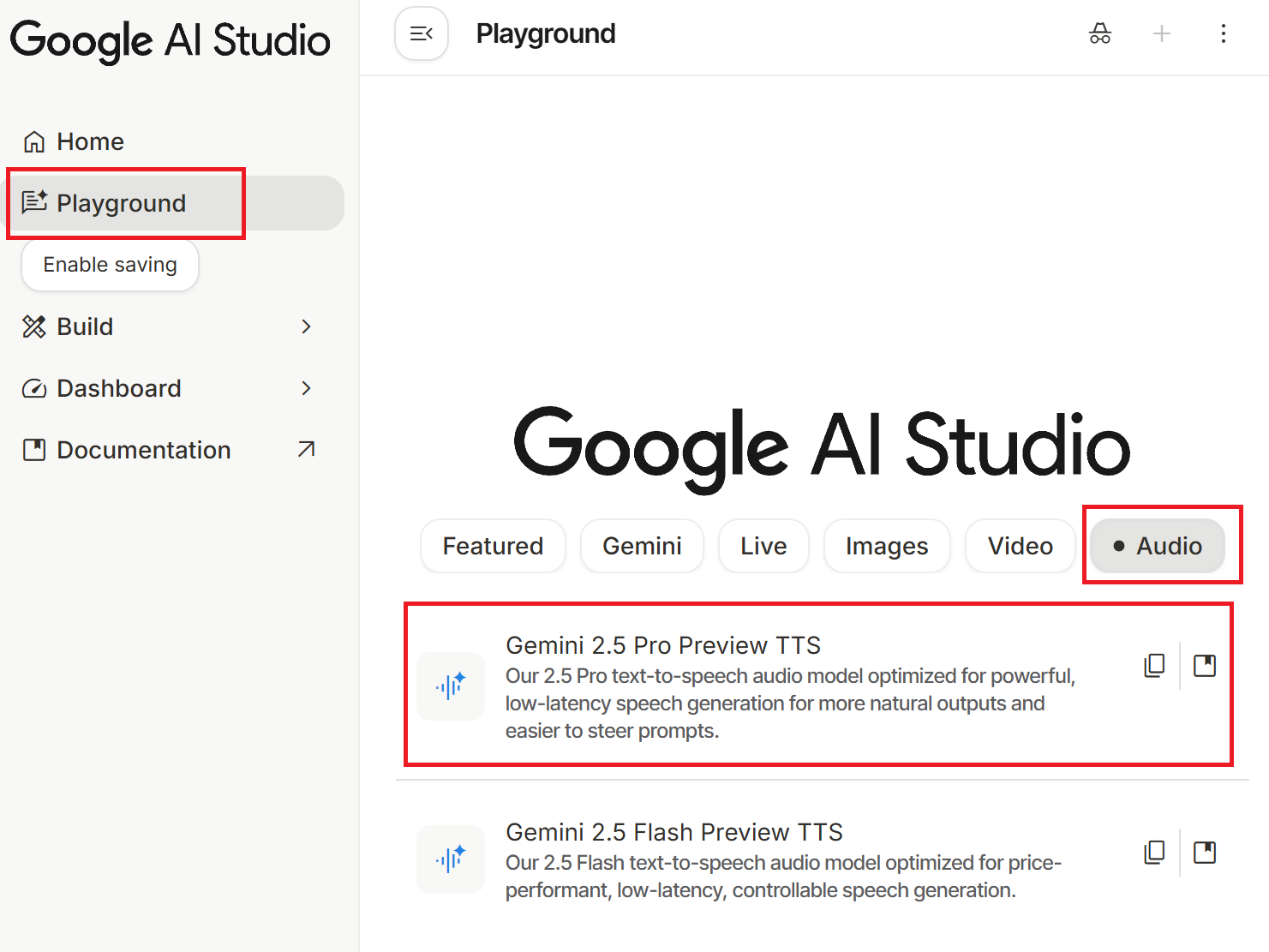
First, go to the Google AI Studio homepage (you must be logged into your Google account) → click "Playground" in the left menu → select the "Audio" category at the top → click "Gemini 2.5 Pro Preview TTS". You can also access it directly via this link.
Basic Steps:
- Paste your prepared script into the Text input box on the left or center.
- Select a Voice in the settings field.
- Click the "Run Ctrl + ↵" button (or use the shortcut Ctrl + Enter); the system will start processing and generate an audio file.
- After listening, click the three-dot icon (⋮) on the right and select the download option to obtain the audio file in
.wavformat.

WARNING
If you generate a large amount of content in a short period, you may encounter the error Failed to generate content: user has exceeded quota. Please try again later., which means your quota has been exhausted. Please try again later.
Parameter Settings Explanation
When using the tool, AI Studio provides several parameters to adjust the quality of speech generation. They are explained below:
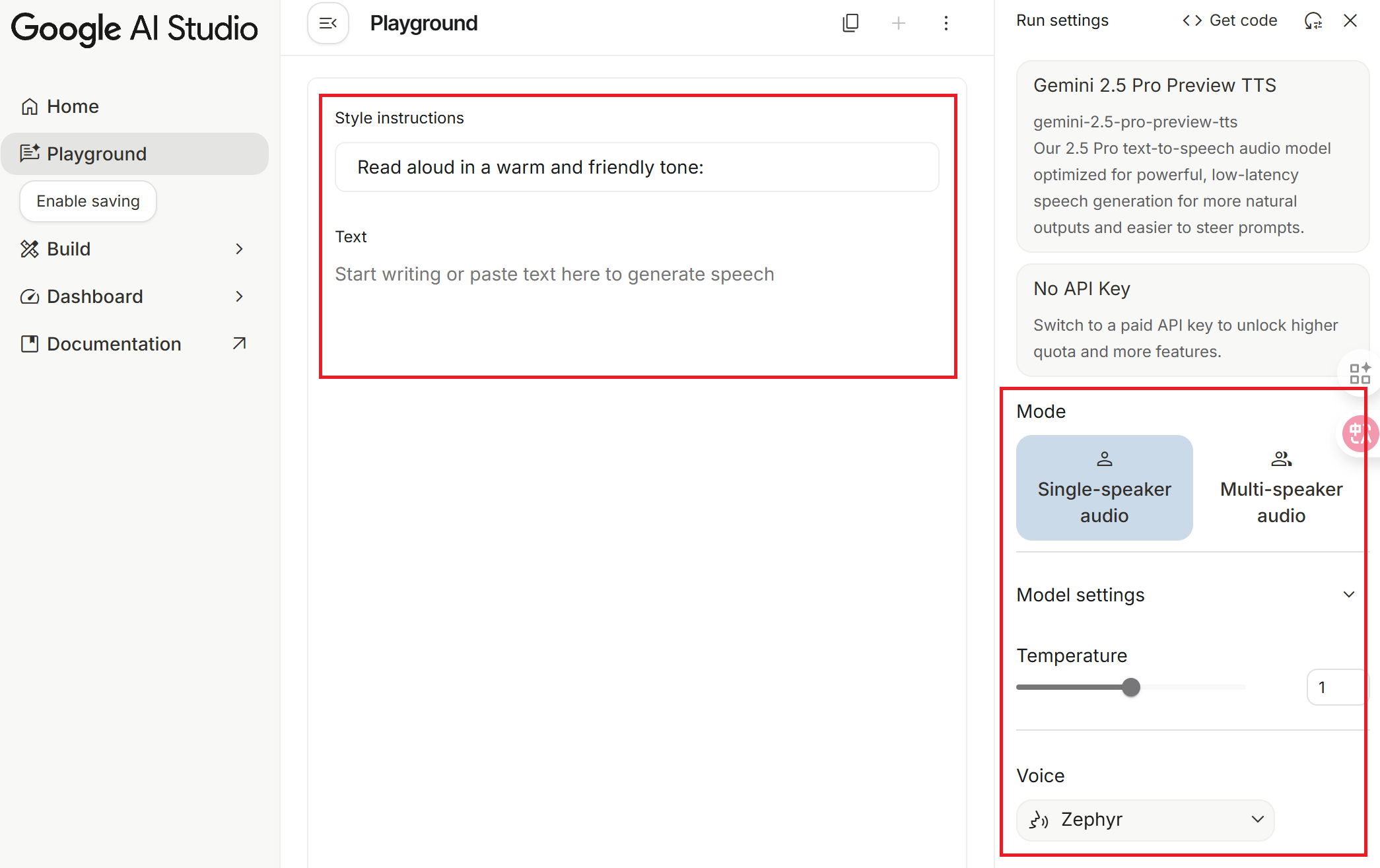
Mode
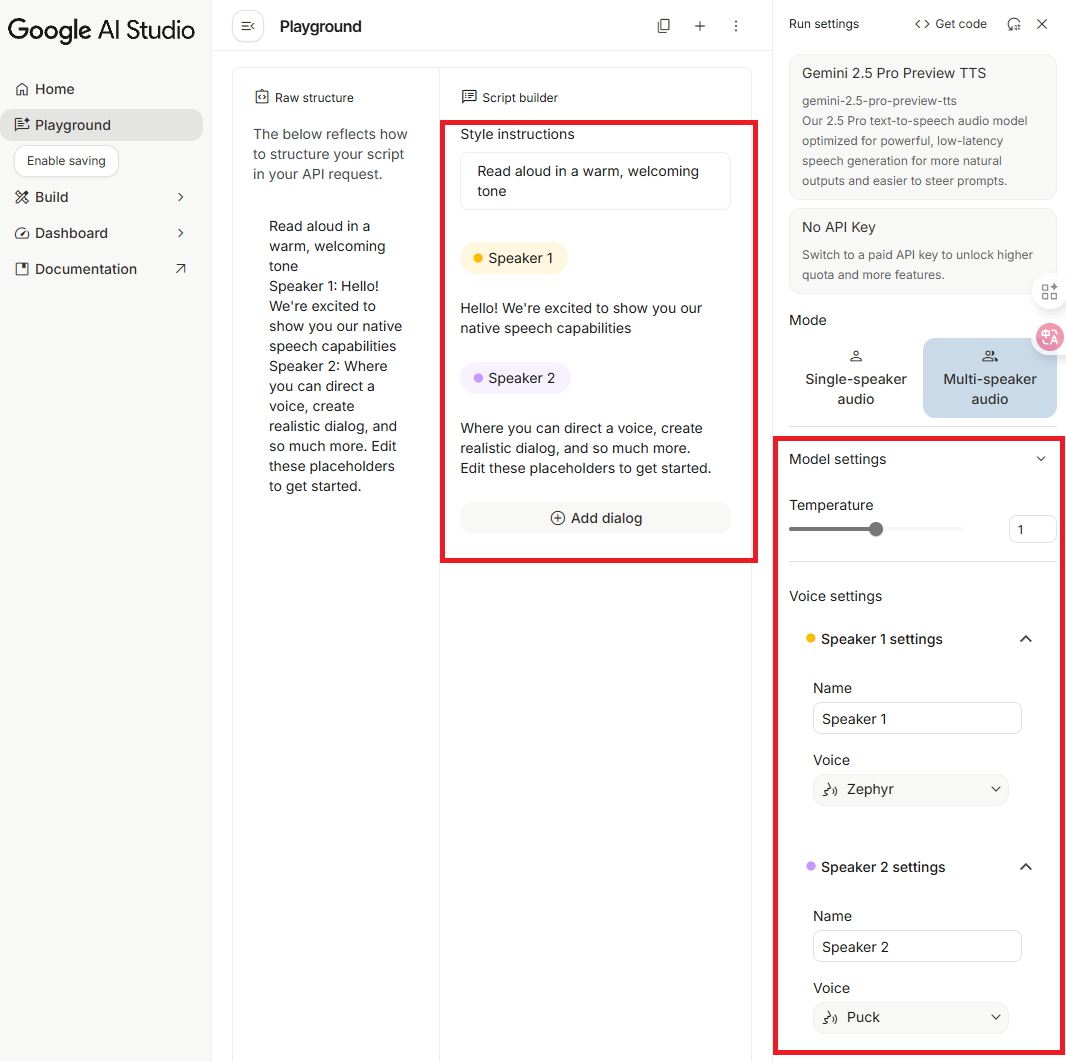
Select the corresponding mode based on your script requirements:
- Single-speaker audio: For single-person scripts.
- Multi-speaker audio: For multi-person scripts (currently limited to two people; it is unclear if more will be added in the future).
Model settings
Temperature
The range is 0 to 2, with a default of 1. This parameter controls the randomness of speech generation; you can think of it as how much freedom the director allows the actor.
I personally recommend keeping the default value of 1. Although theoretically, lower values are more stable, in practice, adjusting it downwards often leads to "normal audio at the beginning, followed by sudden silence or meaningless noise," and the trigger threshold is inconsistent (for example, yesterday it only triggered below 0.6, but today it started having issues below 0.7). Furthermore, below 0.6, the tone tends to sound robotic. Unless you have the patience to repeatedly test the limits, it is recommended to keep the default value.
Voice
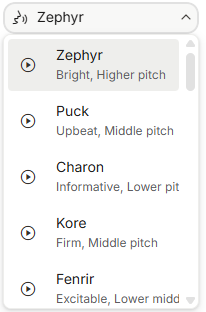
In addition to model parameters, the choice of voice also affects the final result. The system offers various voice characters, each with a description of its features (e.g., Zephyr is described as Bright, higher pitch). You can also play a sample before selecting.
Style instructions
Through style instructions, you can further adjust the emotion, speed, tension, and context of the speech. You can think of this as the script telling the actor how to interpret the content.
Text
Enter the text script you want to convert to speech. It is recommended to note the following:
- Optimization for Mixed Chinese and English: Adding a half-width space between Chinese and English words can help the AI switch languages and pronunciation more accurately.
- Paragraph Pauses: Empty lines between paragraphs represent pauses, but please do not use more than two consecutive empty lines. Testing shows that too many empty lines may mislead the model, causing the speech to end prematurely.
- Duration Limit: The limit for a single generation is about 11 minutes (I tested it for the past two days, and the limit was fixed at 10 minutes and 55 seconds, but today it reached 11 minutes and 05 seconds). If the content is only slightly over, you can try running it again, as the speech speed varies slightly each time, and it might generate the full content next time.
TIP
Since training data contains a high proportion of Mainland Chinese terminology, the system often automatically replaces Taiwan-specific terms with Mainland terms (e.g., replacing "堆疊" with "堆棧"). Although you can try inserting spaces between keywords (e.g., 堆 疊) to force the model to treat them as independent characters, they might actually be replaced by even stranger terms. There is currently no perfect solution for this, so I have personally chosen to give up on it.
Script Example
The following is an example script for one episode (in actual use, I create multiple episodes, each containing over 40 words):
Style instructions
Please use a vivid, enthusiastic, and natural conversational tone. Keep the Chinese intonation soft and friendly, and use a standard American accent for English.Text
Welcome to the first episode of English for Software Engineers. Our topic today is Git version control. This is a tool that modern developers rely on every day. We will scan through everything from basic commands to team collaboration terminology. Please relax, prepare your ears, and let's get started.

Version Control
Version Control
Example: Git is the most popular distributed version control system.
Git 是最受歡迎的分散式版本控制系統。

Repository
Repository
Example: Please clone the repository to your local machine.
請將檔案庫複製到你的本機。

Initialize
Initialize
Example: Run git init to initialize a new repository here.
執行 git init 在這裡初始化一個新檔案庫。

Although there are many Git commands, mastering these 50 core actions will allow you to handle 90% of work scenarios. It is recommended to listen repeatedly, especially the difference between Rebase and Merge. In the next episode, we will enter the world of .NET development.Conclusion
The biggest difference between Google AI Studio's Generate speech and traditional TTS is that it "understands and interprets" the script content rather than just reading it word-for-word. This feature has both pros and cons:
Suitable Scenarios
- Creating podcasts or audio content that requires natural, emotional speech expression.
- Practicing before a report or presentation; by setting Style instructions, you can hear how the AI interprets your content, which may be helpful for those who are not good at reading aloud or reporting (yes, that's me).
- Script rewriting or table reads, quickly generating different styles of interpretation.
Unsuitable Scenarios
- Situations requiring verbatim reading that is completely faithful to the original text, such as legal documents or technical specification documents. In these cases, it is recommended to use traditional TTS tools.
Changelog
- 2025-12-25 Initial document created.