
Getting Started with ASP.NET Core Web API - Improving Enum Comments
TLDR
- By default,
Swashbuckle.AspNetCorecannot display XML comments for Enum members, leading to poor API documentation readability. - By implementing the
ISchemaFilterinterface, you can parse the XML documentation generated by the project and inject Enum member comments into theDescriptionfield of the OpenAPI Schema. - It is recommended to configure
JsonStringEnumConverterin the global settings withinProgram.csrather than on individual DTO properties to maintain consistency in API input and output. - When implementing
EnumSchemaFilter, ensure you check whetherschema.Descriptionalready contains content to avoid duplicate descriptions.
Problem Scenario: Swagger Cannot Display Enum Member Comments
In an ASP.NET Core Web API project, even if complete XML comments are written for Enum definitions and DTO properties, Swagger UI cannot display these comments by default. This makes it difficult for developers to understand the specific meaning and corresponding values of Enum parameters when using the API.
When you encounter this issue: When the project uses Swashbuckle.AspNetCore as the OpenAPI documentation generation tool, and the API interface contains enum type parameters.
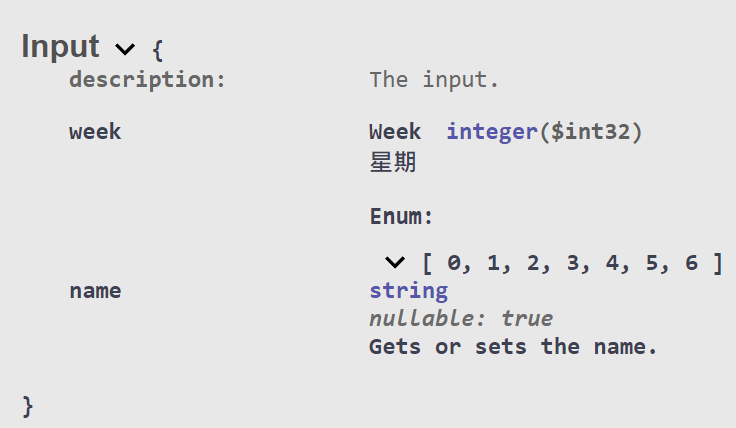
Solution: Implementing ISchemaFilter to Inject XML Comments
To ensure Swagger correctly displays detailed descriptions for Enums, you can implement ISchemaFilter to intercept the Schema generation process and read the compiled XML file to inject the content.
Implementing EnumSchemaFilter
This Filter checks if the target type is an Enum, extracts the corresponding <summary> content from the XML file, and formats it into schema.Description.
public class EnumSchemaFilter : ISchemaFilter {
    private readonly XDocument xmlComments;

    public EnumSchemaFilter(XDocument xmlComments) {
        this.xmlComments = xmlComments;
    }

    public void Apply(OpenApiSchema schema, SchemaFilterContext context) {
        Type enumType = context.Type;

        if (!enumType.IsEnum) {
            return;
        }

        // Avoid duplicate descriptions
        if (schema.Description?.Contains("<p>Possible values:</p>") == true) {
            return;
        }

        StringBuilder sb = new(schema.Description);

        sb.AppendLine("<p>Possible values:</p>");
        sb.AppendLine("<ul>");

        foreach (string enumMemberName in Enum.GetNames(enumType)) {
            string fullEnumMemberName = $"F:{enumType.FullName}.{enumMemberName}";

            string enumMemberDescription = xmlComments.XPathEvaluate(
              $"normalize-space(//member[@name = '{fullEnumMemberName}']/summary/text())"
            ) as string;

            if (string.IsNullOrEmpty(enumMemberDescription)) {
                continue;
            }

            long enumValue = Convert.ToInt64(Enum.Parse(enumType, enumMemberName));

            sb.AppendLine($"<li><b>{enumValue}[{enumMemberName}]</b>: {enumMemberDescription}</li>");
        }

        sb.AppendLine("</ul>");

        schema.Description = sb.ToString();
    }
}Registering in Swagger Configuration
In Program.cs, add the above Filter to the AddSwaggerGen configuration:
builder.Services.AddSwaggerGen(options => {
    foreach (string xmlFile in Directory.GetFiles(AppContext.BaseDirectory, "*.xml")) {
        XDocument xmlDoc = XDocument.Load(xmlFile);
        options.IncludeXmlComments(() => new XPathDocument(xmlDoc.CreateReader()), true);
        options.SchemaFilter<EnumSchemaFilter>(xmlDoc);
    }
});Conclusion: By using a custom ISchemaFilter, you can effectively solve the issue where Swagger cannot read Enum comments, providing developers with a more user-friendly API documentation reference.
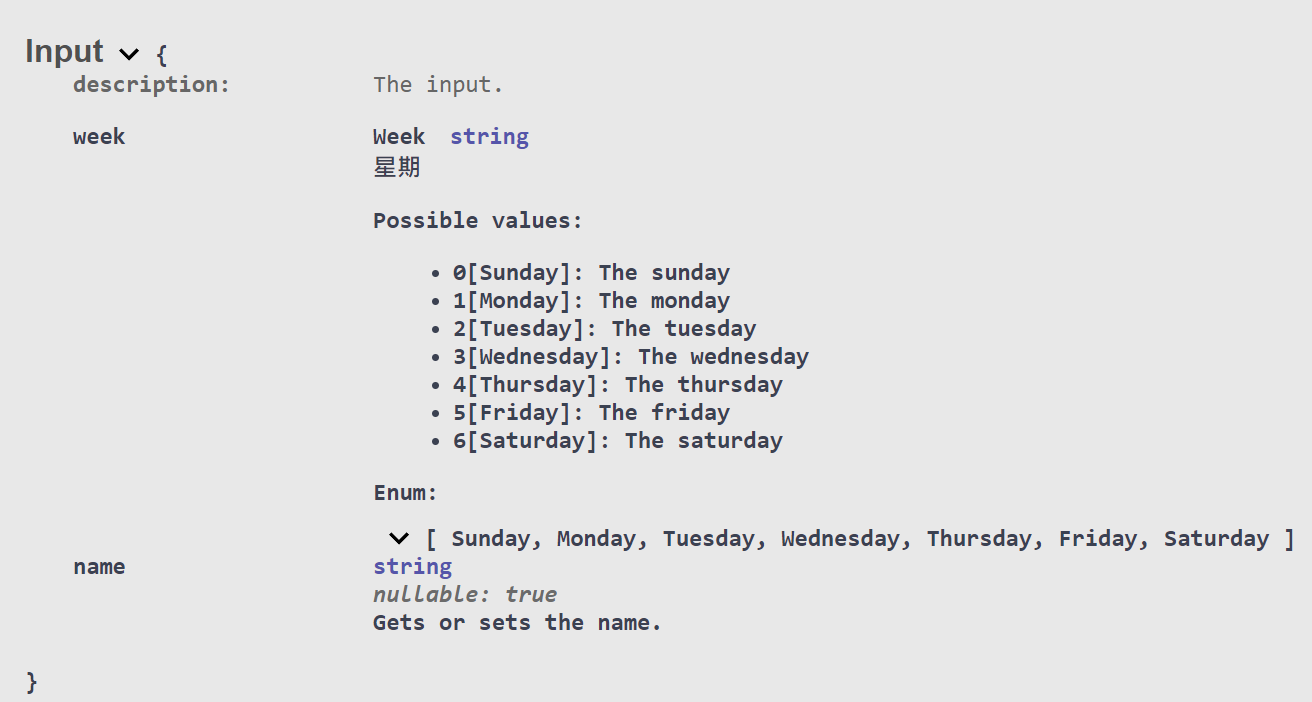
Recommendations for Using JsonStringEnumConverter
When you encounter this issue: When developers want the API to transmit Enum string names instead of numeric values, but do not want to break the Swagger display format.
If you use [JsonConverter(typeof(JsonStringEnumConverter))] directly on DTO properties, it will cause the Swagger documentation display to become cluttered. It is recommended to perform global configuration in Program.cs instead:
builder.Services.AddControllers()
    .AddJsonOptions(options => {
        options.JsonSerializerOptions.Converters.Add(new JsonStringEnumConverter());
});Conclusion: Setting the converter globally ensures consistent API behavior and avoids repeated declarations on every DTO property. Combined with the EnumSchemaFilter mentioned above, you can display the mapping between Enum values and names in Swagger simultaneously.
Changelog
- Initial version created.
- Fixed a bug where
EnumSchemaFilterwould repeatedly add Enum descriptions.
- Fixed a bug where