
How to Continue Browsing Websites with Insecure SSL Certificates
TLDR
- When a browser displays an SSL security warning, common causes include self-signed certificates, expired certificates, domain name mismatches, or untrusted certificate authorities.
- If the page provides an "Advanced" option, you can click "Proceed to [site] (unsafe)" to bypass the warning.
- If the page does not provide an option to continue, you can force access by typing the string
thisisunsafeon your keyboard. thisisunsafeis a hidden command; it is only recommended for use when you are certain the website is safe (e.g., internal development or testing environments).
Reasons for Insecure SSL Certificates
When you encounter this issue: The browser triggers a security mechanism to block access when it detects risks in the connection's SSL/TLS certificate.
Common reasons include:
- The SSL certificate is self-signed and not issued by a trusted Certificate Authority (CA).
- The SSL certificate has expired.
- The certificate content does not match the domain name being accessed.
- The browser does not trust the authority that issued the certificate.
- The internal development environment uses a certificate for testing purposes.
How to Bypass SSL Warnings in Chrome
Standard Cases
When you encounter this issue: When the browser displays a security warning page and explicitly provides an "Advanced" option in the interface.
Steps:
- Click the "Advanced" option on the page.
- Click the "Proceed to [site] (unsafe)" link.
- The browser will force the target website to load.
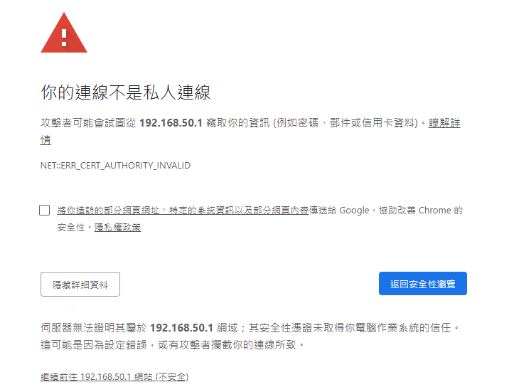
Special Cases (No Option to Proceed)
When you encounter this issue: When the browser enforces strict security policies, resulting in a warning page that does not provide any manual bypass links.
Steps:
- Ensure the Chrome browser window is focused.
- Type the string
thisisunsafedirectly on your keyboard (no need to click any input box; no characters will appear on the page while typing). - Once typed, the page will automatically redirect to the target website.
WARNING
This method is a hidden browser feature and is only recommended for use when you are clearly aware of the website's security, such as when accessing internal development environments or test servers.
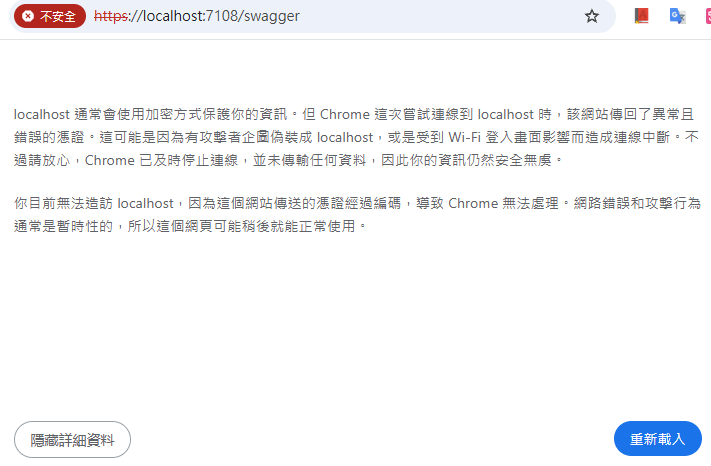
Change Log
- 2025-03-23 Initial version created.