
Calling WebService using HttpClient
TLDR
- In environments where Web References cannot be added, you can manually construct SOAP 1.2 messages via
HttpClientto call a WebService. - It is recommended to prioritize using
dotnet-svcutilto generate a strongly-typed client from WSDL; manual SOAP construction is only suitable for extreme scenarios where a usable WSDL cannot be obtained. - Use
XmlSerializerto handle the serialization and deserialization of complex types to ensure the accuracy of parameter passing and return value parsing. - Avoid creating
HttpClientinstances frequently; it is recommended to useIHttpClientFactoryor configurePooledConnectionLifetimeto manage connection lifecycles. - The Media Type for the SOAP 1.2 specification should be
application/soap+xml.
Why manually call WebService with HttpClient
In .NET development, you can usually complete a WebService call using the "Add Web Reference" feature in Visual Studio. However, if the development environment cannot connect to the WebService, preventing the addition of a reference, or if the WSDL file is missing or fails to parse, an alternative approach is required.
Recommended approach: dotnet-svcutil
Since .NET Core, the standard practice is to use dotnet-svcutil (or the "WCF Web Service Reference" in Visual Studio). This tool only requires a local WSDL file to generate a strongly-typed client, without needing a direct connection to the service endpoint.
Note
The generated client is a snapshot of that specific WSDL. If the WebService interface changes, you must re-obtain the WSDL and regenerate the client.
Implementing SOAP calls using HttpClient and XmlSerializer
When a usable WSDL cannot be obtained, you can send a SOAP 1.2 request via HttpClient and use XmlSerializer to handle the conversion of complex objects.
Implementation Logic
The core of this method lies in serializing objects into XML and embedding them within a SOAP Envelope.
public static class WebServiceUtils {
    // It is recommended to use IHttpClientFactory to manage the lifecycle to avoid socket exhaustion or DNS resolution issues
    private static readonly HttpClient httpClient = new HttpClient();

    public static async Task<TResponse> ExecuteAsync<TResponse>(string uri, string method, IDictionary<string, object> arguments, string @namespace = "http://tempuri.org/") {
        XmlSerializerNamespaces serializerNamespaces = new XmlSerializerNamespaces(new[] { XmlQualifiedName.Empty });
        XmlWriterSettings settings = new XmlWriterSettings {
            Indent = true,
            OmitXmlDeclaration = true
        };

        string argsXml = string.Join("", arguments.Select(x => {
            Type type = x.Value.GetType();
            XmlSerializer _serializer = new XmlSerializer(type);
            StringBuilder sb = new StringBuilder();
            using (XmlWriter writer = XmlWriter.Create(sb, settings)) {
                _serializer.Serialize(writer, x.Value, serializerNamespaces);
                // Replace Root node name with Dictionary Key
                return Regex.Replace(sb.ToString(), $@"((?<=^<)(\w*)(?=>))|(?<=</)\w*(?=>$)", x.Key);
            }
        }));

        string soapXml = $@"
            <soap12:Envelope xmlns:xsi=""http://www.w3.org/2001/XMLSchema-instance"" xmlns:xsd=""http://www.w3.org/2001/XMLSchema"" xmlns:soap12=""http://www.w3.org/2003/05/soap-envelope"">
              <soap12:Body>
                <{method} xmlns=""{@namespace}"">
                    {argsXml}
                </{method}>
              </soap12:Body>
            </soap12:Envelope>
        ";

        // SOAP 1.2 recommends using application/soap+xml
        StringContent content = new StringContent(soapXml, Encoding.UTF8, "application/soap+xml");
        using (HttpResponseMessage message = await httpClient.PostAsync(uri, content).ConfigureAwait(false)) {
            if (!message.IsSuccessStatusCode) {
                throw new HttpRequestException($"HTTP request failed with status code {message.StatusCode}: {message.ReasonPhrase}");
            }

            string result = await message.Content.ReadAsStringAsync().ConfigureAwait(false);

            XDocument xdoc = XDocument.Parse(result);
            XNamespace ns = @namespace;
            string resultTag = method + "Result";

            XElement xelement = xdoc.Descendants(ns + resultTag).Single();

            XmlSerializer serializer = new XmlSerializer(typeof(TResponse), new XmlRootAttribute(resultTag) { Namespace = @namespace });

            using (XmlReader reader = xelement.CreateReader()) {
                return (TResponse)serializer.Deserialize(reader);
            }
        }
    }
}Verification
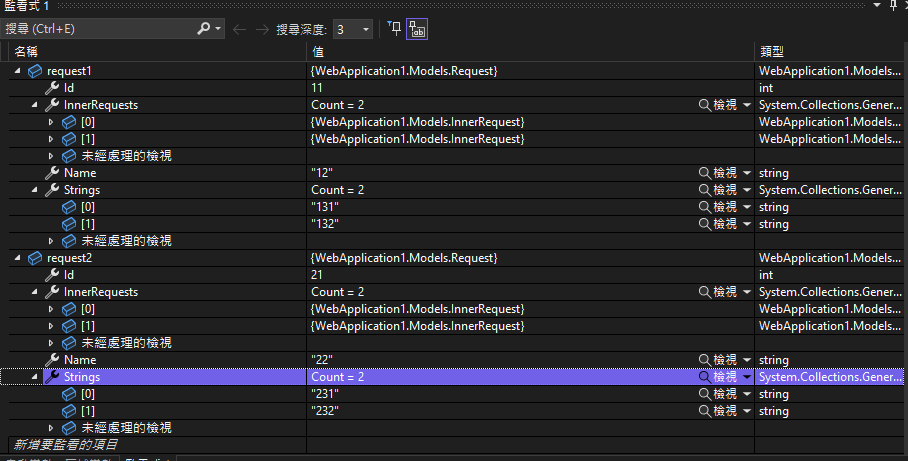
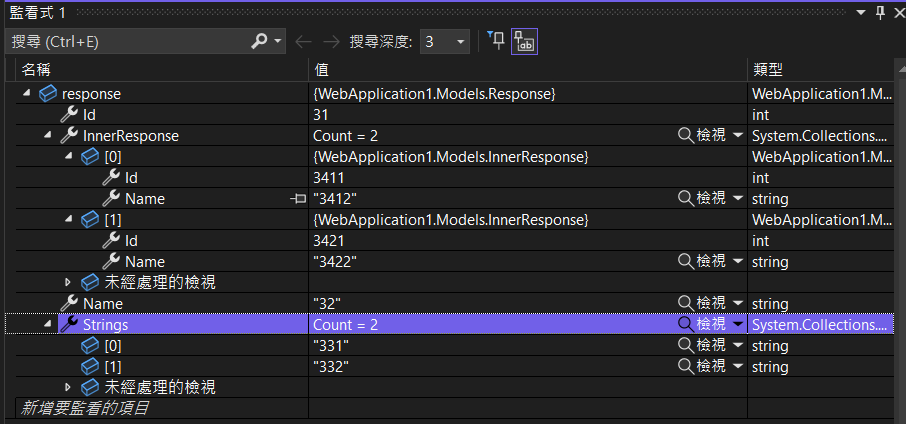
By defining nested Request and Response classes for testing, this implementation can correctly handle parameter passing and return value parsing for complex types.
Changelog
- Initial document creation.
- Fixed a typo in the
ExecuteAsyncparameter type (IDictionary<string, string>should beIDictionary<string, object>). - Rewrote the description to reflect the actual HttpClient + SOAP approach.
- Added links to corresponding executable examples.
- Added code comments regarding HttpClient lifecycle and SOAP 1.2 media type.
- Added a tip about generating a client from WSDL using svcutil and clarified the applicable scenarios for manual implementation.
- Fixed a typo in the